The JeetBuzz app download is free and it works differently on each phone: Android users will need to install an official APK file, while iPhone users can only add a Progressive Web App (PWA) shortcut to their home screen.
To help you decide whether the JeetBuzz mobile app is worth installing or adding to your phone, we looked at how the Android app performs and whether it is a real improvement over the mobile website. We looked at load time, storage space, and in-play betting among other things. We also checked how easy it was to create a new account on the app. Read through before you proceed to download.
You might also want to check out our JeetBuzz refer code guide so you can make the most of the ongoing referral or welcome bonus on JeetBuzz. It explains how the JeetBuzz referral programme works, and how you can earn ৳300 for each person you refer.
Key Specs to Consider Before Downloading JeetBuzz App
JeetBuzz App BD
Android Devices
iOS Devices
Latest App Version
1.35
No App (Just the PWA Shortcut)
File Size
7.26 MB
No download necessary
OS Compatibility
Android 7.0 or later
iOS 14.0 or later
Storage Space
33.61 MB
NA
RAM Requirement
2 GB or more
No Specification
5 Steps to Download JeetBuzz App APK
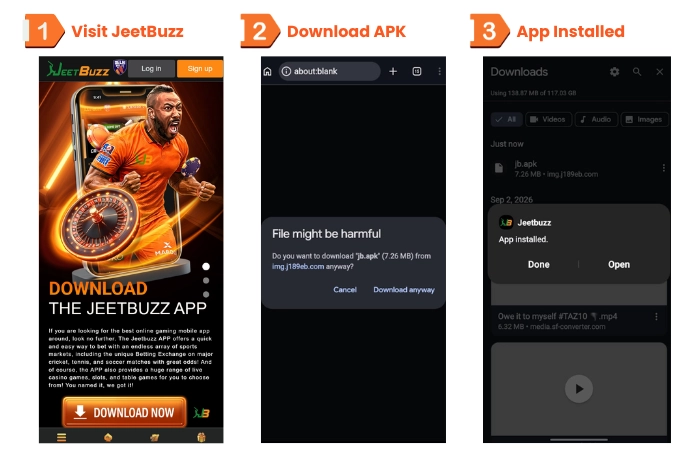
Tap ‘Download JeetBuzz App’ on this page to open the official link. Next, head over to the download section and tap ‘Download Now.’
When you see the message prompt, click ‘Download Anyway’ to continue.
If you get a warning about installing apps from unknown sources, tap ‘Settings’ and allow the necessary permissions for the JeetBuzz app APK to start installing.
Once it’s done, open the downloaded file and tapped ‘Install’ to finish setting it up.
After the installation is done, tap the JeetBuzz app icon in your app drawer to open it.
Downloading and installing the lightweight JeetBuzz apk file on our Samsung S10e was fairly quick and simple | Screenshot taken on 12/11/2026
We searched for the JeetBuzz app listing on the Google Play Store in Bangladesh but couldn’t find one. Just like with other popular betting sites in Bangladesh, the only way to get the JeetBuzz app was by downloading the APK from the official website.
How to Add a JeetBuzz App Shortcut (PWA)
Here’s how you can set up a JeetBuzz PWA shortcut on your device.
Adding a Home Screen Shortcut on iOS
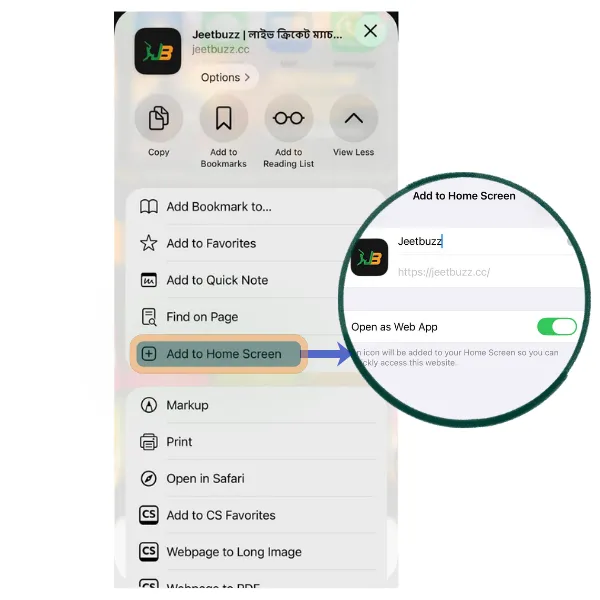
Open the official site in Safari.
Tap the Share icon, then choose Add to Home Screen.
Keep Open as Web App switched on and tap Add.
Add to Home Screen screen with Open as Web App switched on for JeetBuzz.
Installing the JeetBuzz PWA app via Safari browser on iOS | Screenshot taken on 12/11/2026
Adding a Home Screen Shortcut on Android
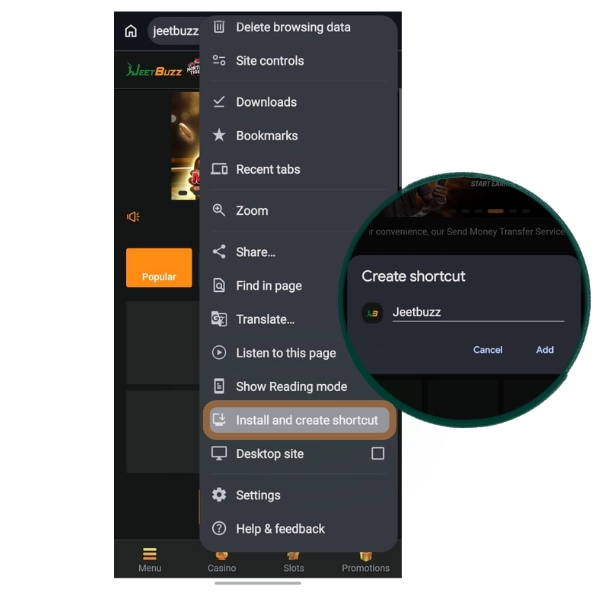
Open the official site in Chrome.
Tap the three-dot menu.
Choose Install and create shortcut.
Click on Create shortcut.
Tap Add to confirm.
Adding a JeetBuzz app link shortcut with Chrome browser on Android | Screenshot taken on 12/11/2026
JeetBuzz App vs Mobile Website
Both the app and mobile versions are identical when it comes to the size of the sportsbook, but the real differences lie in speed, storage, and convenience. This table shows what we found.
Parameters
JeetBuzz BD App
Mobile Website
User Interface
No browser bars, so more room for odds and markets
Same navigation & layout but browser bars take up screen space
Betting Experience
Fewer taps to reach sports and deposits
Extra steps after reopening the browser
Speed
Cricket sports page opens in under 10 seconds on Wi-Fi*
Same page opens in under 30 seconds on 4G data
App Size
7.26 MB download
None
Push Notifications
Native app alerts even when the app is closed or running in the background
Typically depends on mobile browser settings
* It took about 15 seconds with 4G Grameenphone mobile data
User Interface
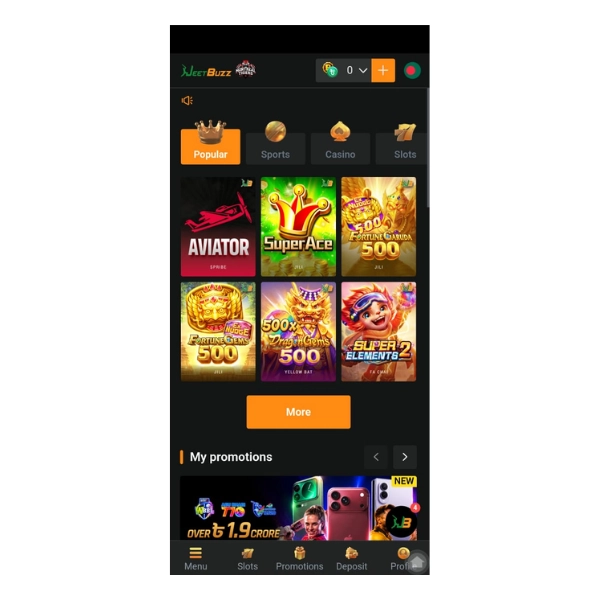
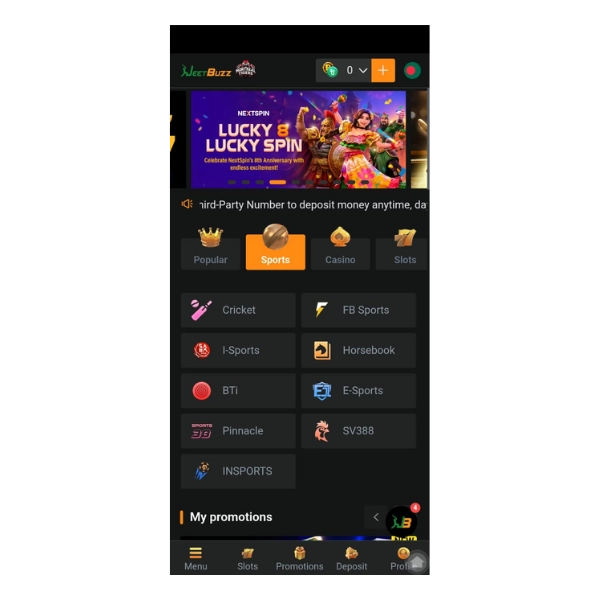
The app makes excellent use of the screen with all the main categories neatly presented. It’s clean, uncluttered and very easy to navigate. You can move from the sports section to the event you’re after in no time at all.
On the mobile website, the address bar is still there and there are promotional banners in a number of the sections so navigating between sections isn’t quite as smooth as it is on the app. Below that you only see Menu, Casino, Slots and Promotions. We had to scroll quite a bit as we were combing through the app for the live cricket markets.
The app’s bottom navigation is particularly useful in that it lets you switch between screens and find the markets you’re after with just a few taps and swipes.
JeetBuzz app’s UI may look plain and simple but it’s quite effective | Screenshot taken on 12/11/2026
Speed
We tested both versions on the same Wi-Fi with a Samsung S10e smartphone. The app loaded in under 20 seconds on both the Wi-Fi connection and the Grameenphone 4G. The browser version was way too slower on both networks and took its own sweet time, so it was clear that the app helps you cut down load time which is real important if you place live bets a lot.
App Storage Size on Device
The APK download is 7.26 MB and the app once installed takes up under 33 MB, which is still light.
Apps with a larger APK package size such as the one you get for 1xBet app download will obviously require more space. Over time, that storage space is going to only get bigger since cached data can grow fairly quickly.
Check out the file size and see if it’s a good fit for your phone before you go ahead and install.
Instant Access with Saved Login
Your JeetBuzz app login credentials are stored locally on your device, giving you relatively instant access to the sportsbook. In between sessions, you don’t have to log in with the Fingerprint prompt which is really nice and adds to the experience.
So what do we recommend?
For smoother navigation and a more native app experience while you’re on the move, the JeetBuzz app APK is the way to go. The mobile website shortcut will still take you to the same sportsbook with a similar layout, with all the same local payment options (bKash, Nagad etc.), but it’s clearly inferior in terms of speed, navigation and the overall betting experience.
Don’t want to install another app from any source other than Google Play? Then the mobile website is the way to go. Perhaps you do not care about where the app comes from but you’re after faster access to markets and events, safe and secure biometric login and data saving in which case you can go ahead and download the JeetBuzz app.
Top Features of the JeetBuzz Live App
Nine Providers in One Tab
JeetBuzz brings together nine different providers so you can bet on sporting events that span the whole spectrum. Each provider stands out by offering something unique and this combination by itself is very distinct as opposed to what you get with most bookmakers.
For example, choosing Cricket gets you into a betting exchange where you can place back and lay bets on available markets. I-Sports is an Asian style bookie with loads of handicap options. On BTi, which is a proper European style bookie, you’ll come across thousands pre-match, in-play and outright betting options predominantly on top league football events.
SV388 stands out for its niche categories, including Cockfighting and other arena events.
JeetBuzz brings together nine sportsbook providers, offering users thousands of sports betting events including cockfighting | Screenshot taken on 12/11/2026
Full Bangla Interface
JeetBuzz app is tailored for the average bettor in Bangladesh, and it hits you right off the bat. Besides its huge cricket market coverage, the app has a complete Bangla interface which you can switch into easily. If you want another app with full Bangla language support, our Krikya mobile app guide shows how its local experience compares.
On top of that, there is a resourceful help centre with articles and troubleshooting guides all written in Bangla. You can also select Bangla as a preferred language in the live chat to talk to a Bangla-speaking agent.
You can also open accounts in BDT (৳), and make low initial deposits starting at around ৳300 using bKash, Nagad, Rocket, Upay, local bank transfers, or crypto.
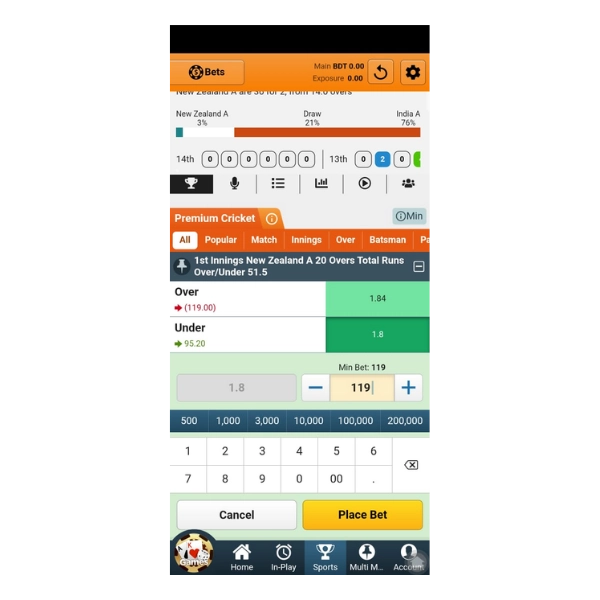
In-play betting is truly an underrated feature of JeetBuzz. We were watching a live NZ A v India A match. We were tracking the over/under market, a push notification came in that a key batter had been run out and the odds updated instantly.
We tapped the JeetBuzz app notification on our lock screen and it opened the live market in under 3 seconds. The fingerprint prompt appeared straight away and we were able to place our bets with a single tap at the new odds prior to the next ball being bowled.
The push notifications, biometric login and quick bet slip are all fairly standard stuff, but we were genuinely impressed at how they all work together to provide a truly fluid in-play experience in every instance we tested.
JeetBuzz pairs multiple features to give you a pretty good live betting experience | Screenshot taken on 12/11/2026
Biometric Access
JeetBuzz’s advanced biometrics keep your betting activity, your wallet balance, your transaction history and all your account info safe and protected from others. You can also log in without a password which is a massive advantage over a lot of other betting apps that don’t have this feature.
How to Register on the JeetBuzz App
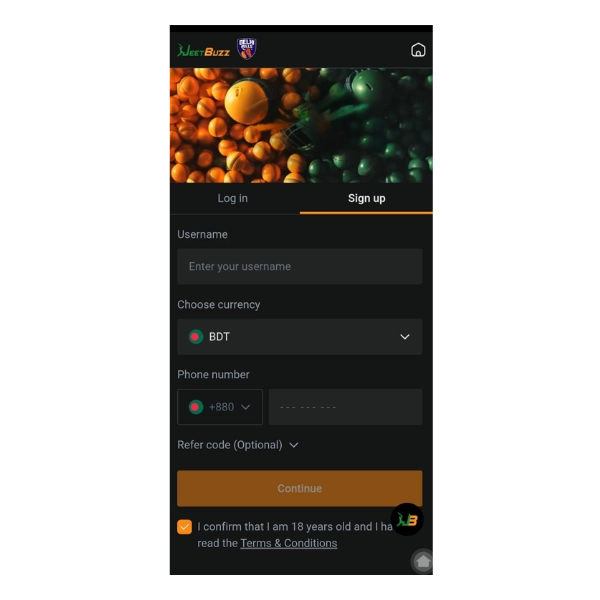
JeetBuzz has a fairly standard simple sign-up process for a mobile app | Screenshot taken on 12/11/2026
On the home screen, tap Sign up.
Type in your username.
Just make sure BDT is your currency.
Enter your phone number (beginning with the +880 code).
Type the JeetBuzz referral code into the Refer Code (optional) field if you have one.
Check the box to agree to the Terms, and then tap Continue.
Have a code for JeetBuzz referral? Enter it during registration to unlock the sports welcome offer, with which you can get up to ৳7,777 bonus. For a bigger sports welcome bonus, you might want to check out our Linebet app for Bangladesh.
The Bottom Line: Should You Download the JeetBuzz App?
The JeetBuzz app is a real step up from the mobile website.
It uses less than 50MB and doesn’t take up any space at all on your phone. And the full screen layout, the bottom navigation and the clean, uncluttered user interface are all huge pluses.
One of the things that really stood out for us during the testing was just how quickly you can access a live market for such a lightweight app. The push alert just opens the app and the fingerprint login gets you in in a couple of seconds tops. No worry about browser timeouts or having to type your password while the odds are changing.
The switch to the full Bangla interface is pretty useful as well for bettors with specific language preferences.
Yes, Android users will need to sideload the JeetBuzz APK from the site, and iOS users only get a shortcut. That said if you’re into live betting the app is definitely worth a look.
Rating 🌟: 4 out of 5.
Pros
+
Lightweight 7.26 MB APK with about 33 MB storage space once installed; ideal for phones with limited storage
+
Biometric login works really well and pairs with push alerts to give secure and instant app access
+
The whole interface switches into Bangla in one tap, making it one of the unique Bangla betting apps
Cons
-
App not listed on Google Play, so Android users must sideload the APK from the official site
-
No exclusive app-only bonuses or promotions if you're looking for one
Pritthijit Ray has 6+ years' experience in sports betting, with a focus on football and cricket. His passion for football is evident in his posts that blend robust knowledge of the game with genuine insights. Fluent in English, Hindi, and Bengali, Pritthijit brings depth and credibility to his bookmaker reviews and promo code analyses, ensuring they're informative, unbiased, and relevant.
Open the official JeetBuzz site on your mobile phone, tap ‘App Download’ on the nav menu to go the app download section, and then tap ‘Download Now.’ Accept the warning, go into your phone settings and tweak them to allow unknown apps, and then tap Install to complete the process.
The APK file from JeetBuzz installed without any issues. Note that Chrome will still give you a warning if you’re trying to download any APK from outside of Google Play so stick to the official site.
Delete the file and uninstall the app. We came across a mirror listing called JeetBuzz which turned out to be a completely different football game.
The latest version we’ve installed is 1.35. Always check the official site for newer versions prior to updating.
Log in, then tap Sports on the home screen.
Choose Cricket or any of the nine sportsbook providers mentioned above.
Select a match.
Tap on the market that you’re after.
Type in your stake amount in the bet slip.
Tap Place Bet to confirm.
When we tested we didn’t see one. The Promotions tab on the JeetBuzz site did have the same offer though, a ৳7,777 sports welcome bonus for new users.