The Linebet app Bangladesh download is completely free for every user. In October 2026, we put the app to the test, checking load time, layout, and live-market updates.
The app loaded in under 30 seconds, demonstrating how agile it is. On a live cricket market, odds refreshed about every 5-10 seconds. The mobile layout was clean and easy to navigate on a phone screen.
Linebet works on both Android and iOS, though the two setups differ slightly. This guide walks you through every step, from download to your first bet.
How to Download the Linebet App?
Linebet is not available on the Google Play Store or Apple App Store. Both platforms restrict betting apps, so you download the Linebet app directly from the official Linebet website.
Android users get a proper Linebet Android APK file to install. iPhone users add the app as a Progressive Web App(PWA), a website you save to your home screen so it opens and works like a regular app, since Apple doesn’t allow betting apps in the App Store.
No matter whether you choose the Linebet APK or the iOS shortcut, the app download only takes a couple of minutes.
This is what we found after reviewing the specs for both platforms.
Linebet App BD
Android
iOS
Latest App Version
v255.0.2
NA
File Size
47.68 MB
NA
OS Compatibility
Android 5.0 or higher
NA
Free Storage Needed
About 146 MB installed
NA
Step-by-Step Walkthrough of Linebet APK Download
Google Play’s strict betting rules mean Android users need the official APK instead.
Here is how I downloaded and installed it on my own phone.
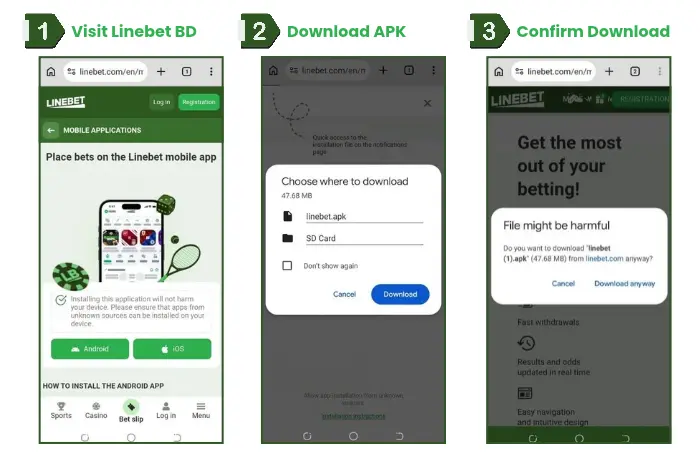
Open your phone’s browser and go to the official Linebet website. Linebet App Bangladesh APK Download Process | Screenshot taken on 02/10/2026
Tap the menu icon, then select “Mobile Applications.“
Tap the Android button to start your Linebet APK download.
A pop-up will warn that the file might be harmful. Tap “Download Anyway” to continue.
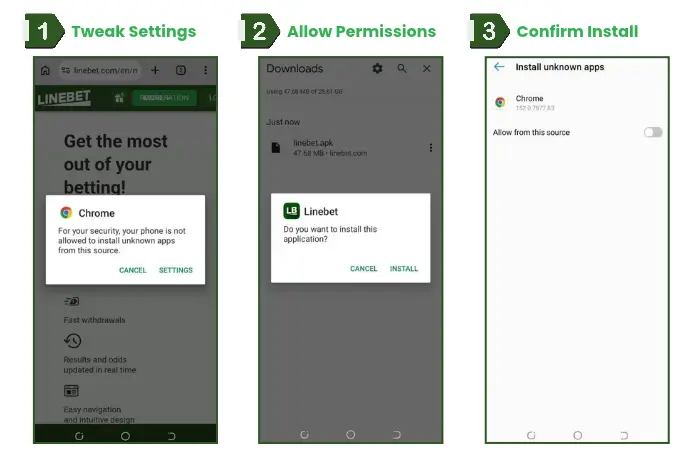
Open your phone’s Downloads folder and tap the linebet.apk file. If your phone blocks the installation, tap “Settings” on the prompt. Linebet App Download Requires Special Permissions | Screenshot taken on 02/10/2026
Go to Settings ➡”Security & Privacy” and tap “Install Unknown Apps.”
Select the browser you used to download the file (for example, Chrome) and turn on “Allow from this source.“
Go back to the downloads folder and tap the linebet.apk file again.
Wait for the installation to finish. It is complete when the Linebet icon appears in your app drawer.
What I noticed during my testing: It took me about two minutes to download and install the APK on my Tecno Pop 5 Pro over a 76 Mbps WiFi connection. On Grameenphone 4G, it took 45 seconds to 1 minute longer though, for obvious reasons. I had to allow installs from unknown sources since the app isn’t on the Play Store, but the installation was still easy.
Your Linebet BD app download for Android is now complete. Open the app and log in or register to get started.
You may have noticed that the steps to download and install an APK file from a bookmaker’s website are the same for all bookmakers. So, whether you want to install Melbet APK or Linebet APK, the process does not change.
Step-by-Step Guide to Download Linebet App for iOS Devices
Apple’s App Store guidelines don’t allow standalone betting apps, so Linebet uses a home screen shortcut for iPhone users instead. We found this took under a minute to set up.
Open Safari and visit the official Linebet website.
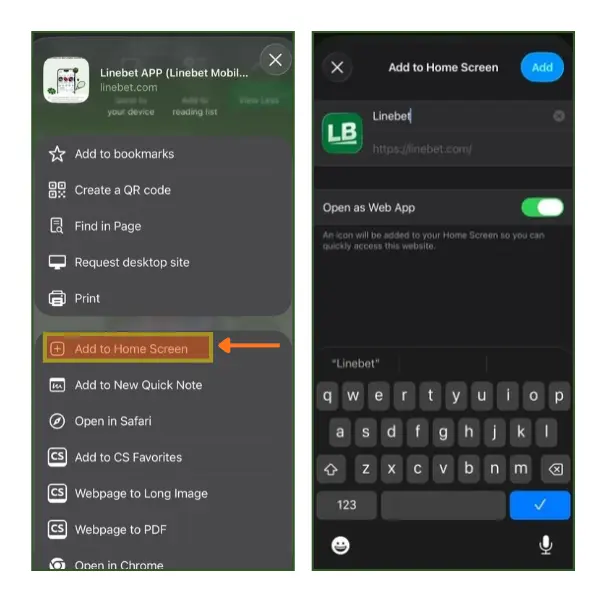
Tap the “Share” icon at the bottom of the screen.
Scroll down and tap “Add to Home Screen.“
Confirm the name as “Linebet” and tap “Add.“
This gives you instant access without needing a Linebet app download from any app store. Once installed, the shortcut behaves like a regular app.
How to add a Linebet App Shortcut to your iOS phone | Screenshot taken on 02/10/2026
Adding Linebet BD App Shortcut (PWA)
A shortcut is different from a full app install. It saves you a step, launching Linebet straight from your home screen through your browser engine.
Adding Linebet Shortcut on Android Devices
Android users can skip the APK and add Linebet to their home screen straight from Chrome. The shortcut opens the site like an app, and it takes less than a minute. If you’d rather have the full app, follow the APK steps above instead.
Open Chrome and go to the official Linebet website.
Tap the three-dot menu in the top right corner of Chrome.
Tap “Install and create shortcut.“
Confirm the name as “Linebet” and tap “Add.“
Tap “Add” again on the “Add to Desktop” screen.
Go to your home screen. The Linebet shortcut is now there, and tapping it opens the site in one step.
Linebet Bangladesh App vs Mobile Website
Both options work well, but they suit different needs. We compared the Linebet mobile app with the mobile web browser version to see how they stack up. And here are our findings.
Parameters
Linebet BD App
Mobile Website
User Interface
Streamlined, app-only menus
Same layout, slightly slower to load
Betting Experience
Faster bet slip, saved login
Identical markets, extra tap to log in
Speed
Loads in under 30 seconds on Wi-Fi and about 20 seconds on Grameenphone 4G
Depends on browser and connection
App Storage Size
Around 146 MB on device
No storage needed
User Interface
The Linebet mobile website and app share the same design and navigation structure, so you won’t feel lost switching between them.
On both, the top bar holds the “Log in” and “Registration” buttons, with promotional banners below. Underneath sit the “Live” and “Sports” tabs, plus a favourites star and a search icon.
A bottom menu gives one-tap access to Sports, Casino, Bet slip, Log in, and Menu.
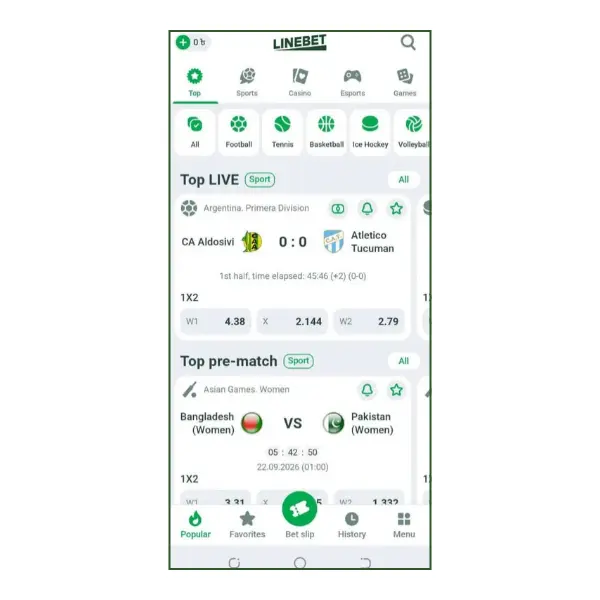
Linebet App Bangladesh User Interface | Screenshot taken on 02/10/2026
The app uses the same categories and menu order, with the sports list and live events in the same places. The main difference is the login. The app keeps you signed in, while the website asks you to log in again in a new browser session.
Betting Experience
We tested bet placement on both versions, using live cricket markets on the app. On the app, switching between markets took 3 to 5 seconds, and confirming a bet slip took about 5 seconds. On the mobile website in Chrome, the same actions took 7 and 10 seconds. The markets and odds were the same, but the app was faster at both steps, and confirming a slip took about half as long.
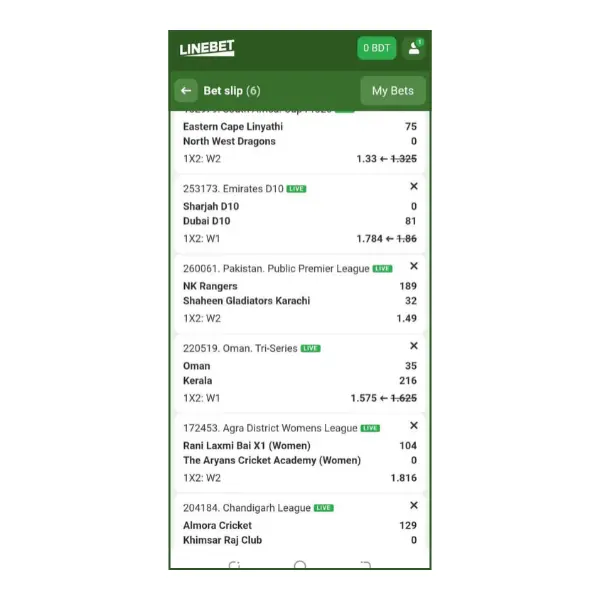
A Bet Slip with 6 selections on Linebet BD Mobile App | Screenshot taken on 02/10/2026
The slip also updates as matches progress. When we built a 6-selection cricket slip, the odds on several selections changed while it was open. In the Emirates D10 match, for example, the odds for a Sharjah D10 win moved from 1.86 to 1.784, and the old price stayed on screen, struck through.
Speed
We ran both versions on the same 76 Mbps Wi-Fi connection on a Tecno Pop 5 Pro. The app opened straight to the dashboard in about 5 seconds, while the mobile website in Chrome took roughly 10-15 seconds to load the same odds.
That makes the app about 10 seconds quicker. On a live cricket market in the app, odds refreshed about every 20 seconds.
Overall, the app is much quicker than the mobile browser for adding markets to your bet slip, switching between options, and keeping up with odds changes.
App Storage Size on Device
The Android APK needs about 146 MB of free space once installed. That’s rarely an issue, but worth checking if your storage is already tight. If you have an older phone with limited storage, stick with the mobile website.
If you want the fastest experience and lower data use over time, download the Android APK or add the iOS shortcut instead.
Out of all the betting apps in Bangladesh, 1xBet takes up the least space on your phone. Handy if you want something light that won’t clog up your storage. Check out our guide to 1xBet app download for Android here.
Top Features of the Linebet App
Bet Types and Betting Experience
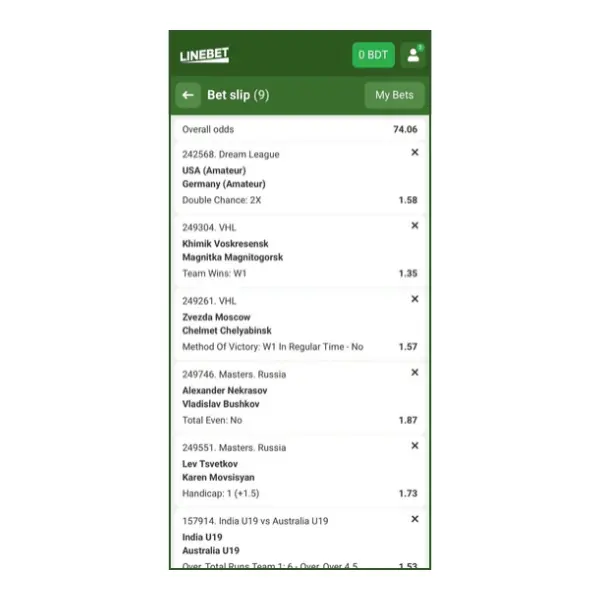
Linebet offers single bets, accumulators, chain bets, and system bets. We built a 9-selection accumulator with overall odds of 74.06, mixing selections from different sports on one slip. Switching between markets took 3 to 5 seconds, and confirming the slip took about 5 seconds. We also tested [single bets/chain bets/system bets], and switching to them took 10-20 seconds.
A 9-leg Acca Offering High Odds Built With the Linebet Mobile App | Screenshot taken on 02/10/2026
Live Betting
We tested live betting on cricket. In the app’s live cricket list, we watched a T20 match in the Kuwait ILT20 Development league, Boubyan Warriors vs Failaika Guardians, at 0/0 after 0.1 overs. The odds on the Boubyan Warriors win showed green, and the Failaika Guardians win showed red, marking a rise and a fall.
On a live cricket market, odds refreshed about every 20 seconds. We also built a 6-selection live cricket slip. In the Emirates D10 match, Sharjah D10 vs Dubai D10, the odds on a Sharjah D10 win moved from 1.86 to 1.784 while the slip was open.
Navigation and Layout
The app’s top tabs are Top, Sports, Casino, Esports, and Games, with sport filters underneath (Football, Tennis, Basketball, Ice Hockey, Volleyball). The bottom menu has Popular, Favorites, Bet slip, History, and Menu.
For Bangladeshi users, the home screen shows Bangladesh (Women) vs Pakistan (Women), an Asian Games cricket match, under “Top pre-match,” so we found it without searching. Finding a specific live cricket match through the Sports tab took 5 taps and about 5-10 seconds.
Saved Login
The app keeps you signed in. When we reopened it, it went straight to the home screen with our balance in the top-left corner and no login step. Reopening the app took about 2 to 3 seconds. However, on the website, we had to log in again in a new browser session, which added 6 to 7 seconds approximately.
Push Notifications
Every match card in the app has a bell icon for alerts. We turned on alerts for a live cricket match, and the first notification arrived 10 seconds after the event started.
Pros and Cons of the Linebet App
Linebet is often ranked among the top 10 betting sites in Bangladesh, but we decided to try it ourselves to see how it really performs. Here’s our honest review, highlighting both its strengths and areas where it could get better.
Pros
+
On an average, the bet slip confirms in about 5 seconds, versus 10 on the mobile website
+
Similarly, the market changes swiftly on the app taking about 3-5 seconds versus 7 on the mobile website
+
Bell icon on every match card for alerts so you can stay in the loop
+
The app lets you stays logged in and it just takes a single tap to get reconnected
Cons
-
Not available on Google Play or App Store
-
iOS setup relies on a Progressive Web App , not a full app
-
Occasional browser security warnings during APK install
How to Register on the Linebet App for Bangladesh?
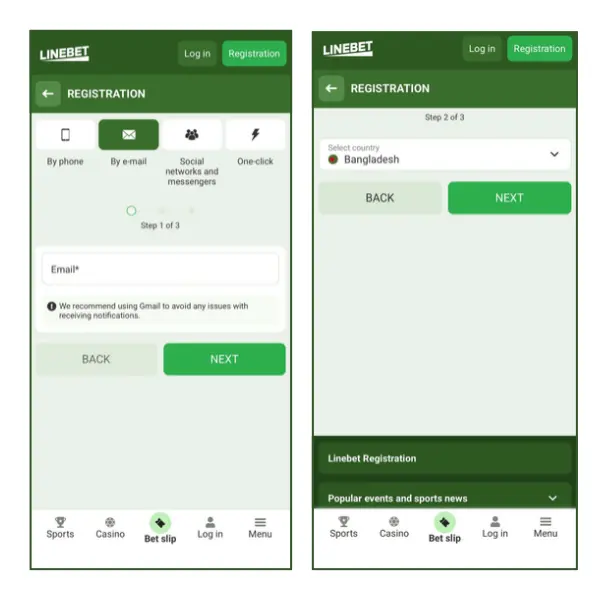
Registration takes three short steps. We completed our registration in under two minutes using the email method.
Open the app and tap “Registration.”
Choose your method (we used “By e-mail“) and enter your email address.
Confirm your country as Bangladesh and currency as BDT.
Set a password and, if you have one, enter the code promo Linebet STARMAX to unlock extra bonus value on your first deposit.
Select a bonus type, such as “Bonus for sports,” then tap “Register.“
Enter the promo code STARMAX at registration to claim a 100% Sports Bonus on your first deposit, up to 15,000 BDT. We’ve covered how this code works, linked above.
Linebet Bangladesh App Registration Form | Screenshot taken on 02/10/2026
How to Place a Bet on the Linebet App?
Placing a bet follows the same logic across sports and live events. Here’s the process we used for a live match.
Open the app and tap “Sports” or “Live” from the bottom menu.
Select your sport, league, or specific match.
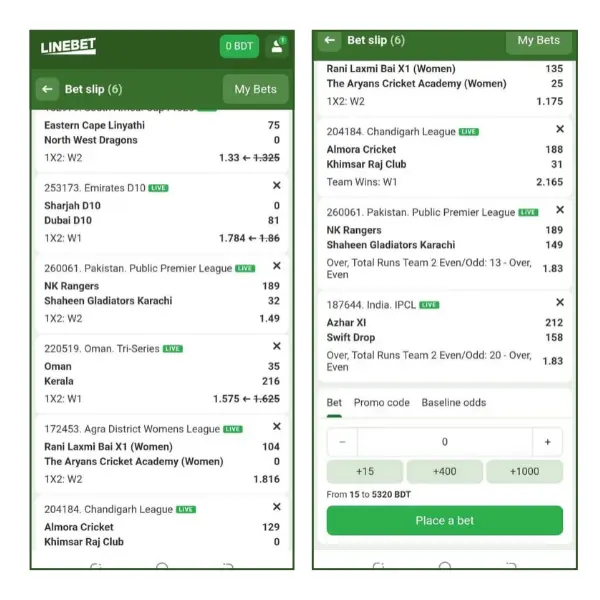
Tap the odds for your chosen outcome to add it to your bet slip.
Enter your stake amount in the bet slip.
Tap “Place Bet” to confirm.
Placing a Live Bet on the Linebet App Bangladesh | Screenshot taken on 02/10/2026
Final Verdict: Our Experience With the Linebet App
After testing the Linebet app, we were thoroughly impressed by its reliability. Another key aspect why we think Linebet deserves to be in the top 10 betting sites in Bangladesh is how fast and responsive it is when placing bets. Plus, the support for local payment options like bKash and Nagad is solid too, so you can deposit straight from your wallet without needing a card or bank transfer.
That said, downloading and installing the APK took longer than expected on mobile data, and requires granting additional permissions for installation from unknown sources. Installation is simpler on iPhone, where you can add the app as a Progressive Web App without accessing the App Store.
Overall, due to its ease of use, speed, robust live betting features, and reliable performance, we rate the Linebet app 4 out of 5 stars. For more information on features and bonuses, please refer to our full Linebet Review.
Pritthijit Ray has 6+ years' experience in sports betting, with a focus on football and cricket. His passion for football is evident in his posts that blend robust knowledge of the game with genuine insights. Fluent in English, Hindi, and Bengali, Pritthijit brings depth and credibility to his bookmaker reviews and promo code analyses, ensuring they're informative, unbiased, and relevant.
As an offshore bookmaker, Linebet holds a valid Curaçao license, refer number OGL/2024/565/0553, to operate its website and offers betting options to users in Bangladesh.
Yes, if you download it from the official Linebet website. Avoid third-party APK sites, since these can carry outdated or altered files.
Yes. The Linebet app Bangladesh download costs nothing, and there are no hidden fees to install or open it.
The current Android APK is version v255.0.2. Linebet has no App Store app, so iPhone users add it to their home screen instead.
There’s no separate lite app, but the mobile website offers the same features without taking up storage space on your phone.
Linebet offers 24-hour support by phone, live chat, and email. Live chat is fastest for account issues, while email suits detailed queries you can wait a few hours on. You’ll find all three in the Contacts section.
/https%3A%2F%2Fmedia.footballwhispers.com%2Fmain%2F2026%2F10%2FLinebet-rounded-edge-logo.png)




/https%3A%2F%2Fmedia.footballwhispers.com%2Fmain%2F2026%2F10%2FDBBet-App-1.png)
/https%3A%2F%2Fmedia.footballwhispers.com%2Fmain%2F2024%2F12%2FBest-betting-sites-Bangladesh-1.png)
/https%3A%2F%2Fmedia.footballwhispers.com%2Fmain%2F2026%2F09%2FDafabet-IN-App.png)
/https%3A%2F%2Fmedia.footballwhispers.com%2Fmain%2F2026%2F09%2FDbbet-Promo-Code-FWDBB.png)
/https%3A%2F%2Fmedia.footballwhispers.com%2Fmain%2F2026%2F07%2F1xBet-Promo-Code-CASHMAX.webp)
/https%3A%2F%2Fmedia.footballwhispers.com%2Fmain%2F2026%2F03%2FMelbet-Promo-Code-FWMEL.png)