The DBbet mobile app is free for everyone in Bangladesh. Earlier this month, our team of in-house bettors tested it to see how simple it is to set up, how quickly it runs, and how stable it is. We also checked if the live odds update fast, if the biometric sign-in works properly, and if the data saver mode runs smoothly.
In the sections below, we guide you through every step, starting from downloading the DBbet app to placing your first bet. New players in Bangladesh will also learn how to register a new account on the DBbet app.
DBbet App Download
Getting the DBbet app on your phone is easy, but how you do it depends on your device. On Android, you can download the DBbet APK and set it up right away. On iPhone, you can add the DBbet PWA to your home screen, which works much like the mobile site.
Here’s what you’ll find with each option.
DBbet App BD
Android
iOS
App Available?
Yes
No (Just a PWA shortcut)
Downloaded From
DBbet Official Website
DBbet Official Website
Latest App Version
1.2
NA
File Size
48.14 MB
NA
OS Compatibility
Android 7.0 or higher
NA
Free Storage Needed
Around 50 MB installed
NA
DBbet Android APK Download: A Step-by-Step Walkthrough
Google Play has strict rules for betting apps in Bangladesh, so Android users need to download the official APK from the bookmaker instead. Anyone after the DBbet Bangladesh app on Android has to get it this way.
Here is exactly how we downloaded and installed it on our own phone:
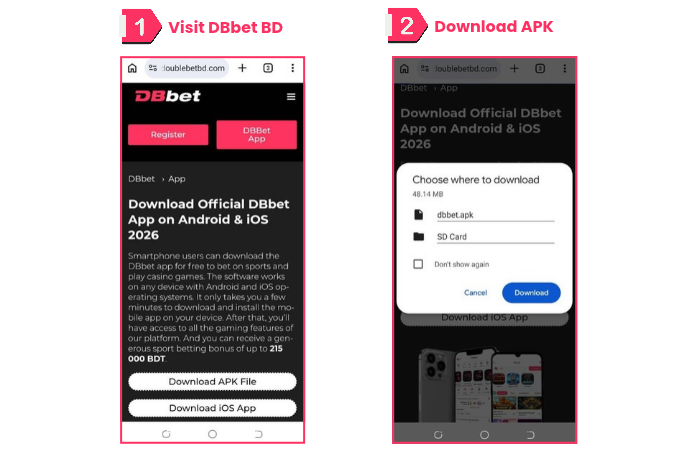
Open your phone’s browser and go to the official DBbet website.
Tap the app option in the homepage menu. DBbet App Download Process | Screenshot taken on 09/10/2026
Choose the button that downloads the APK file, and the download will begin.
A warning pop-up may appear saying the file could be harmful. Tap “Download Anyway” to continue.
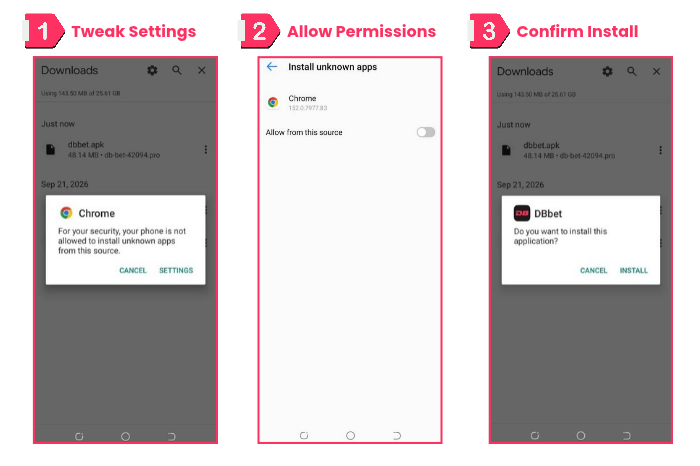
Once downloading finishes, open the DBbet APK file from your Downloads folder. DBbet APK Download and Install Needs Special Permissions | Screenshot taken on 09/10/2026
Chrome will warn that your phone isn’t allowed to install unknown apps from this source. Tap “Settings.”
On the “Install unknown apps” screen, turn on “Allow from this source” for Chrome.
Go back, tap the APK file again, and tap “Install” when prompted.
Wait for the install to finish. You’ll know it’s done once the DBbet app icon appears in your app drawer.
What I noticed during my testing: Installing the DBbet mobile app took roughly two to three minutes on a Tecno Pop 5 Pro connected to 50 Mbps Wi-Fi. Switching to Grameenphone’s 4G network added another minute. Since the DBbet Android app isn’t listed on the Play Store, I first had to enable installs from unknown sources, but that extra step didn’t make the process difficult.
Want a proper betting experience on your mobile from one of the top betting apps in Bangladesh? Check out our guide on Mostbet app Bangladesh download APK for more information.
Using DBbet on iOS Devices
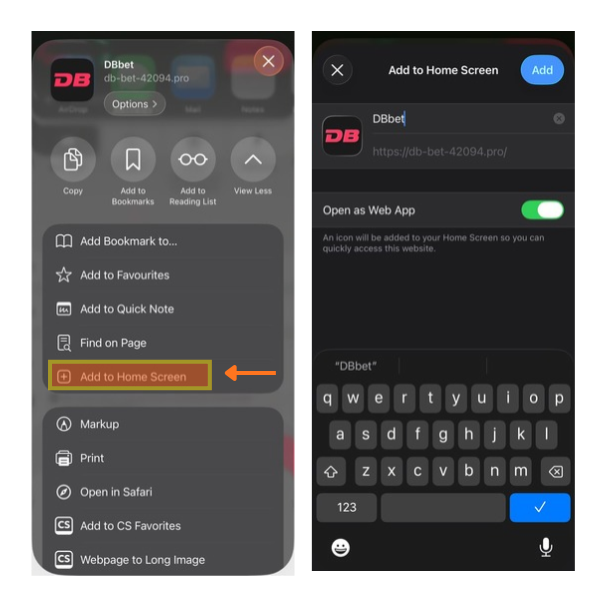
Apple’s rules don’t allow standalone betting apps, so iPhone users should make do with getting a Safari shortcut from the DBbet mobile website instead. Setting it up from scratch took us less than a minute. It puts an icon on your home screen that opens just like any other app. The steps are simple:
How to add a DBbet App Shortcut to your iOS phone via Safari | Screenshot taken on 09/10/2026
Launch Safari and head to the official DBbet website.
Look at the bottom of the screen and tap on the Share icon.
Scroll down and select “Add to Home Screen.”
Name the shortcut “DBbet” and tap “Add” to confirm.
That’s your DBbet app download for iOS sorted.
Adding DBbet Bangladesh Android PWA Shortcut
If you’d rather keep your phone light, a shortcut is a handy option. It isn’t a full install. It just opens DBbet in your browser, so there’s nothing heavy taking up space. Think of it as a quick way in rather than a separate program.
Adding DBbet Shortcut on Android Devices
Chrome lets Android users skip the APK and pin DBbet to the home screen. We followed these steps on my own phone to add the DBbet Android PWA, and it worked well.
Open Chrome and go to the official DBbet website.
Tap the three-dot menu in the top right corner.
Scroll down and tap “Install and create shortcut”.
Select “Create shortcut”. Chrome notes that shortcuts open in Chrome, so this is not a full app install.
Keep the name “DBbet” and tap “Add”.
Select “Add” once more on the “Add to Desktop” prompt. The DB icon then appears on your home screen.
Tap the icon, and the DBbet website opens right away.
Want the full app instead? Use the APK steps above. Both routes lead to the same account, so sign-up comes next.
DBbet Bangladesh App vs Mobile Website
The good news is that you don’t lose anything by picking one over the other. Both let you bet on the same sports and casino games. The real difference shows up in how fast things load, how much space you have, and how often you plan to place bets.
Parameters
DBbet BD App
Mobile Website
Speed
Loads quicker because a lot of the data already lives on your phone
Can feel a bit slower, depending on your browser
Storage
Needs roughly 100 MB of space
Takes up none
Data use
Uses less once the first download is done
Uses more, since pages reload every visit
Getting in
One tap on your home screen and you’re there
You type the address and sign in each time
Updates
You install new versions yourself
Refresh the page, and you get the latest version
Layout
Clean and built just for the app
Same look, though it takes a little longer to appear
Speed
We put both versions through the same Wi-Fi connection to see how they compared. The app took us to the dashboard within a few seconds. The website needed a little longer before the odds showed up.
Storage Space
On Android, the APK takes up about 100 MB. Most newer phones won’t notice that, but if your storage is already close to full, check before you download anything.
Data Usage
Once the first download is out of the way, the app uses much less data day to day. That helps a lot if you bet often when you’re away from Wi-Fi.
Access
The app is a single tap from your home screen, with nothing to type. The website is different because you have to search for the current working address or remember it. Mirror links change often, so that address isn’t always the same.
Updates
With the app, you download each new version yourself when DBbet releases one. The website looks after this for you, since it refreshes in the background every time you visit.
User Interface
Once everything has loaded, the menus and navigation look almost the same in both. Switching between the app and the mobile site won’t leave you feeling lost, because DBbet keeps the layout consistent.
If your phone is older and short on space, the mobile website is the better choice. If you want quicker access and lower data use over time, go for the Android APK or add the iPhone shortcut.
Top Features of DBbet Mobile App
We tried out the app ourselves and compared our experience to what others have said. Here are the things that stood out to us.
Friendly User Interface
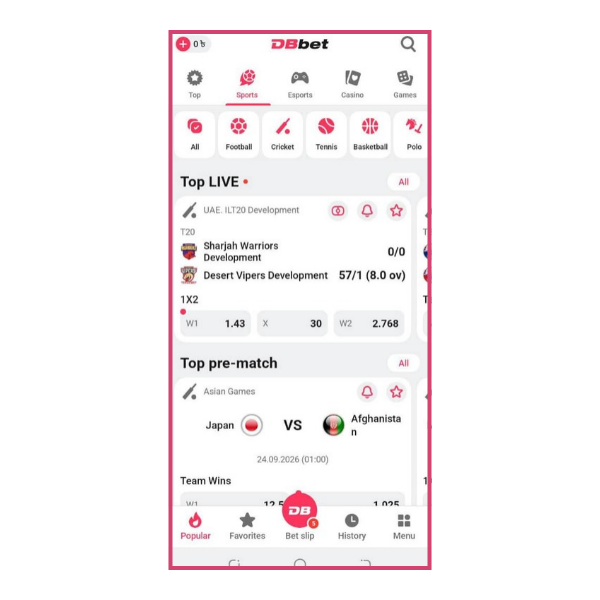
The navigation felt better from the very first minute, and although some features also exist on the mobile website, they run more smoothly inside the app, with menus that open faster and a switch between sports that feels much quicker. The app’s sport tabs run All, Football, Cricket, Tennis, Basketball, and Polo, with live and pre-match cards loading directly underneath, so switching sports is a single tap.
DBbet App Bangladesh User Interface | Screenshot taken on 09/10/2026
Streamlined Profile Management
Uploading documents and photos for KYC verification was easy for us, and because everything sits in one place, your account stays in order without much effort, which helps a lot if you want faster withdrawals and fewer trips to support.
Better Betting Experience
The app stays quick whether you want to bet on sports, play slots, or check live scores on the go, and we followed three matches at once without any lag, while switching between markets during a match felt just as smooth.
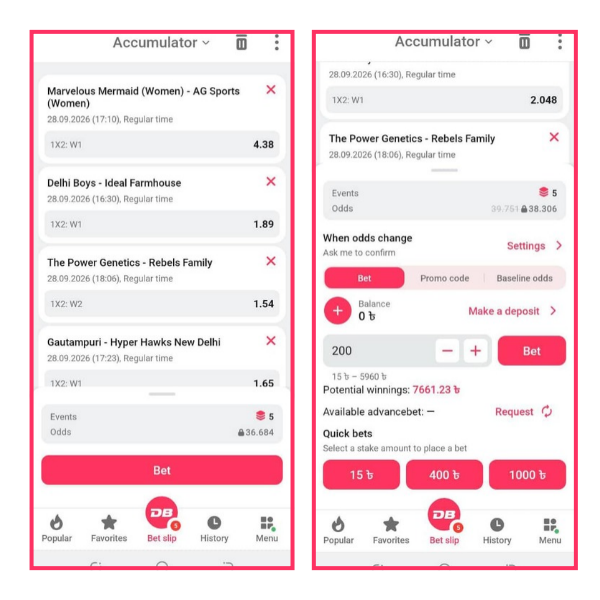
On a live T20 match, we built a 5-selection accumulator, and the odds updated while the slip was open, moving from 39.751 to 38.306 as one selection’s price shifted from 2.789 to 2.766. The slip also shows stake entry, potential winnings, and quick-bet buttons for 15, 400, and 1,000 BDT.
Data Saver Mode
This mode shrinks odds feeds, graphics, and casino visuals so they use far less mobile data, and when we left the app running on mobile data for an hour, usage stayed low, which is a real help if you’re on a limited or prepaid plan.
Biometric Login
Your fingerprint or face gets you into your account in under a second, so you get real security without slowing down your daily logins.
Instant Access
Your session stays saved, which means you can go straight to your favourite events instead of typing your details into a browser every time you visit.
Push Notifications
You get alerts for match updates, goals, and bet slip changes as they happen, and during testing they reach us within seconds of kickoff, so there’s no need to keep refreshing the page. All you need to do is turn on notifications, and you’ll get updates as the event unfolds.
DBbet App Pros & Cons
We decided to try out the DBbet app for Android ourselves to see how it works. Here’s our honest breakdown of what it does well and where it could be better.
Pros
+
Clean mobile layout that is easy to move around in
+
Quick-bet buttons speed up staking on the bet slip
+
Sport tabs (Football, Cricket, Tennis, Basketball, Polo) with live and pre-match cards one tap away
+
bKash, Nagad, and Rocket deposits, several with 0% commission
+
Push notifications keep you updated without opening the app
Cons
-
Android users must install an APK instead of using the Play Store
-
Older iPhones have no App Store version
-
Security warnings can appear during the APK install
DBbet Mobile App Registration
Creating a new account on the DBbet mobile app only takes a few short steps, and we finished ours in under two minutes using the email option.
Open the app and tap “Registration,” then choose “By e-mail.”
Enter your first name, surname, and email address.
Confirm Bangladesh as your country, then add your region and phone number if prompted.
Select Bangladeshi taka as your currency, set a password, and enter a promo code if you have one.
Choose a bonus type, then tap “Register” to complete the process.
Your account is ready as soon as registration is complete, with no extra verification needed to start browsing markets.
Before you start, it’s worth checking out the DBbet promo code FWDBB on offer right now. Note that entering the valid promo code when you sign up lets you you unlock that first deposit bonus.
Steps to Place a Bet on DBbet
Once you’re logged in, placing a bet follows the same logic across sports and live events.
Open the app and tap “Sports”or “Live” in the bottom menu.
Pick your sport to pick from available events or leagues for that sport.
Choose a specific match to reveal the odds for different markets.
Tap the odds for the market you wish to bet on, and it will be added to your bet slip.
Enter your stake amount in the bet slip.
Tap “Bet” to confirm your wager. Placing a Live Bet on the DBbet App Bangladesh | Screenshot taken on 09/10/2026
Final Verdict: Should You Download the DBbet App?
DBbet isn’t considered one of the top-rated betting sites in Bangladesh yet, but it has the potential to get there. Whether you go with the Android APK or the iOS shortcut, DBbet offers one of the smoothest mobile betting experience in Bangladesh at the moment.
Its biggest strengths are its speed, its clean layout, and handy extras like biometric login and data saver mode, while the main drawback is the setup, since installing an APK or adding a shortcut takes a few more taps than a normal app store download.
We give the DBbet app a rating of 4 out of 5, and we think it suits bettors who want quick access and don’t mind a little manual setup at the start. If you’d like a closer look at the bonuses, markets, and overall performance, our full DBbet review is on its way.
Pritthijit Ray has 6+ years' experience in sports betting, with a focus on football and cricket. His passion for football is evident in his posts that blend robust knowledge of the game with genuine insights. Fluent in English, Hindi, and Bengali, Pritthijit brings depth and credibility to his bookmaker reviews and promo code analyses, ensuring they're informative, unbiased, and relevant.
Yes, downloading and installing the DBbet app costs nothing. No hidden fees apply at any stage of the setup process.
To download and install the DBbet APK for Bangladesh, make sure your Android phone runs version 5.0 or higher and has at least 100 MB of free space. If you have an iOS device, you don’t need to worry about these requirements. The web app won’t take up any space on your device.
Both the stores restrict betting software, so DBbet shares its app directly from its own website instead. That’s why you’ll sideload the APK on Android or add the iOS shortcut.
Yes, Dbbet often runs app-exclusive promotions alongside its standard welcome offers. Checking the app regularly helps you catch limited-time bonuses before they expire.
Yes, a valid Dbbet promo code works the same way on the app as it does on the website. Enter it during the final step of registration to activate it.
No, the app and website share the same account and balance. Log in with your existing details and everything carries across.
/https%3A%2F%2Fmedia.footballwhispers.com%2Fmain%2F2026%2F09%2FDBbet-BD-1.png)




/https%3A%2F%2Fmedia.footballwhispers.com%2Fmain%2F2026%2F10%2FLinebet-App-Download-Bangladesh.png)
/https%3A%2F%2Fmedia.footballwhispers.com%2Fmain%2F2024%2F12%2FBest-betting-sites-Bangladesh-1.png)
/https%3A%2F%2Fmedia.footballwhispers.com%2Fmain%2F2026%2F09%2FDafabet-IN-App.png)
/https%3A%2F%2Fmedia.footballwhispers.com%2Fmain%2F2026%2F09%2FDbbet-Promo-Code-FWDBB.png)
/https%3A%2F%2Fmedia.footballwhispers.com%2Fmain%2F2026%2F07%2F1xBet-Promo-Code-CASHMAX.webp)
/https%3A%2F%2Fmedia.footballwhispers.com%2Fmain%2F2026%2F03%2FMelbet-Promo-Code-FWMEL.png)