Coral app review 2026: Complete guide to download, features & free bets for UK bettors

Coral betting app
Download on Android or iOS
Terms & Conditions

T&C → 18+ New UK + ROI customers only. Certain deposit methods & bet types excl. Min first £/€5 bet within 14 days of account reg at min odds 1/2 to get 6 x £/€5 free bets (selected sportsbook markets only, valid 7 days, stakes not returned). Restrictions + T&Cs apply.

Get the app

📱 Coral app at a glance

Looking to freshen up your mobile betting experience? The Coral app is one of the UK’s best sports betting apps, trusted by over 2 million active users across England, Scotland, Wales and Northern Ireland.

Top features

  • Download Size: 45MB (Android), 52MB (iOS)
  • Minimum OS: Android 5.0+, iOS 12.0+
  • Live Streaming
  • Cash Out
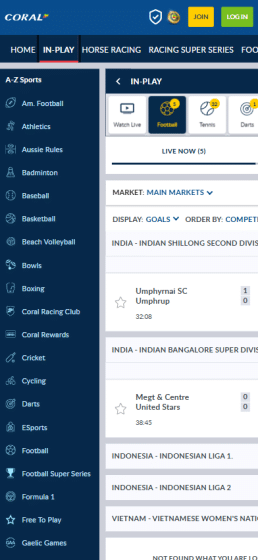
  • In-Play Betting
  • Best Odds Guaranteed
  • Football Super Series

Rating

  • Google Play
    4.5 rating
  • App Store
    4.5 rating
Bonus Amount:  £20 in free bets
Payment Methods:  
visa mastercard paypal apple-pay google-pay bank-transfer

Our Coral app review will give you a detailed look at how to sign up and download the app, claim the sign-up bonus, deposit and wager, and compare it to other top UK football betting apps.

Pros & cons of the Coral app for Android & iOS

footballwhispers satisfied

Pros

  • + Fast withdrawal times (1-3 days)
  • + Free live streaming for thousands of events
  • + Competitive odds on major sports
  • + User-friendly interface
  • + Quick and easy registration process
footballwhispers satisfied

Cons

  • - Limited payment methods compared to competitors
  • - Customer support hours could be extended
  • - App can be slow during peak times

How to Download the Coral App

The Coral betting app download process takes less than 60 seconds. Here’s how to get started:

For Android Devices (Google Play)

  1. Open Google Play Store on your Android phone
  2. Search for “Coral betting app”
  3. Tap the green “Install” button
  4. Wait 30 seconds for installation
  5. Open the app and start betting

Requirements: Android 5.0 or later, 45MB storage

Coral betting app: downlaod on android

For iOS Devices (iPhone/iPad)

  1. Launch App Store on your iPhone
  2. Search “Coral sports app”
  3. Press “Get” next to the Coral logo
  4. Use Face ID/Touch ID to confirm
  5. Open once download completes

Requirements: iOS 12.0 or later, 52MB storage

Coral Welcome offer

How to register a new account on the Coral mobile app: Step-by-step guide

Getting started with the Coral mobile app is straightforward:

  1. Tap the yellow “Join” button (top right)
  2. Enter your email address
  3. Create a unique username and password
  4. Add personal details (name, DOB)
  5. Verify your UK address and mobile
  6. Agree to terms and conditions
  7. Submit and check email for activation

Time needed: 3 minutes

How to claim the Coral welcome offer on mobile

New customers can use the Coral app to claim the Coral welcome offer. Here’s how:

  • Deposit: Minimum of £5
  • Bet: £5+ at odds of at least 1/2
  • Bonus: £30 in free bets (as 6x £5 tokens)
  • Expiry: within 7 days

How to place bets & make deposits on the Coral app

To place a bet using the mobile Coral app, you must be above 18 years of age and a legal resident of the United Kingdom or Ireland.

  • Browse the app’s sports categories and select one to place a bet.
  • Once the sport is selected, you can choose your preferred event and browse the available markets.
  • Once you have decided on the odds you would like to place your bets on, you need to enter your stakes, which will be shown on your betting slip.
  • When you are on the betting slip, you can tap and confirm your bet, and your bet will be placed.

The Coral betting app offers multiple payment options, making depositing money and withdrawing profits extremely easy.

Deposits and withdrawals at Coral can be made using payment methods such as Visa, MasterCard, PayPal, Google Pay, Apple Pay, and Coral Connect Card.

Each user is allocated a permissible deposit limit reflected on their accounts. Before making a deposit, check your account and analyse the deposit amount. Correspondingly, you cannot withdraw all your earnings at once. It would help if you satisfied the wagers to withdraw funds from your account.

Top features of the Coral betting app

  1. Betting odds: The betting market odds available on the Coral app are higher than the average rates offered in the betting market, making Coral one of the best bookmaking companies.
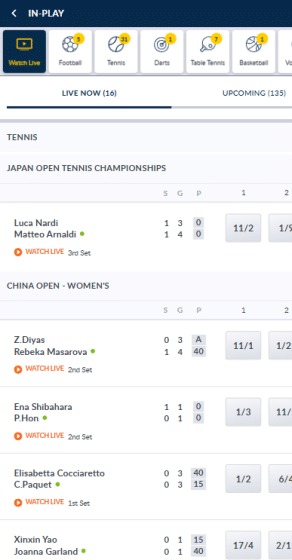
  2. Live betting: The application allows you to place bets during a game. You can place a bet while keeping track of the live events and game statistics through the app itself.
  3. Cash-out: This option lets you cash out your profits before a match ends, allowing you to decide whether you want to risk your stakes by letting it sit through until the end of the match.
  4. Live streaming: The mobile application allows you to watch live matches by offering fast, high-quality videos. Users can watch matches and keep track of their bets from anywhere.
  5. Operating systems: One of the mobile application’s best features is its compatibility with various devices, such as Windows, Android, and iOS.
  6. User-friendly: The thoughtful design of the Coral mobile application and its convenient interface make it extremely easy to use and well-liked by users.

Coral app features

How does the Coral app compare to other top UK betting apps?

Coral is a British institution with a little shy of a century of betting expertise. However, a big brand name only goes so far these days. Smart bettors seek betting apps with the best design, user experience, app-specific promos, and top betting markets, features, and odds.

So, where does the Coral app rank against competitors?

UK bookie # of sports App ratings Sign-up offer Best known for Best feature
Coral 42 4.7/5 (iOS)
4.4/5 (Android)
£50 in free bets Sports coverage Football Super Series
bet365 35 4.7/5 (iOS)
4.6/5 (Android)
£30 in free bets Live streaming Bet Builder
William Hill 30 4.6/5 (iOS)
4.3/5 (Android)
£60 in free bets In-play betting #YourOdds
Ladbrokes 41 4.7/5 (iOS)
4.4/5 (Android)
£20 in free bets Horse racing Odds Boosts
Betfair 28 4.7/5 (iOS)
4.4/5 (Android)
£50 in free bets Betting exchange Footy Accas
BetVictor 32 4.7/5 (iOS)
3.0/5 (Android)
£30 in free bets Mobile app Best Odds Guaranteed
NetBet 25 1.9/5 (iOS)
4.1/5 (Android)
£10 free bet Casino games NetBet Boosts

Coral has plenty going on against top UK bookmakers, particularly in sports coverage and app quality. These are talking points when looking at alternatives:

  • Features and promotionsOnly bet365 can best Coral regarding features. Coral’s biggest feature is the Super Series, a free-to-play prize challenge where players can earn up to £25,000. Its request-a-bet via social media feature, #YourCall, is also worth calling home about, especially when compared to William Hill’s #YourOdds (the only rival that offers this type of feature).
  • Sports & betting markets – Of all UK bookies, Coral covers the most sports (40+), and the market depth is slightly under that of market leader bet365. No other bookie comes close.
  • User feedback, experience, and app ratings – Users give the Coral mobile app a solid rating of 4.7/5 on iOS and 4.4/5 on Android, which matches or beats most competitors except bet365’s Android rating.

Coral app vs. bet365 app

Coral and bet365 are almost on par when the apps are put head-to-head. If you’re looking for a bagful of great features, more racing offers, and a minimalist look, you will feel right at home with the Coral app. It also lines up more than 42 sports versus around 35 at bet365.

Feature Coral App bet365 App
Interface Simple, beginner-friendly layout with fast navigation Sleek, feature-rich interface, slightly more complex
Markets Covers major UK sports well Unmatched market depth, including niche sports
Live streaming Football, horse racing, tennis, and greyhounds Extensive live streaming lineup, including basketball, NFL, and global football matches
Promotions Bet £5 get £20 in free bets; Super Series and Racing Club Bet £10 get £30 in free bets; ongoing odds boosts and early payouts
User feedback Praised for ease-of-use and fast payouts High praise for features; occasional complaints about freezing during live streams
Performance Stable and fast Powerful but can be laggy during live events

Overall, the Coral app is excellent for casual punters and racing fans, while the bet365 app is best suited to those looking for broad markets and streaming variety.

Coral app vs. William Hill app

Comparing two British betting institutions, Coral keeps it simple with its stable app, whereas the William Hill app provides a more feature-dense experience. Here’s how the apps stack up against each other:

Feature Coral app William Hill app
Interface Clean, intuitive, quick to load Feature-packed but more cluttered
Live betting Smooth with stats and visuals Full in-play suite with #YourOdds feature
Live streaming Football, UK racing, greyhounds Football, racing, and other major events
Key features Racing Club and Super Series Bet Boosts, Acca Insurance, #YourOdds
User feedback Easy navigation, consistent reliability Some Android complaints about speed
Performance Stable and snappy to use Some reports of lagging

App store ratings favour Coral, particularly on Android, where it scores 4.4/5 versus William Hill’s 4.3/5. Both apps offer request-a-bet features, but Coral’s feels more streamlined and responsive to bettors’ needs.

Why choose Coral over other UK betting apps?

Coral app is among the UK’s most popular betting apps, with over 3 million downloads across Google Play and App Store. When you open the app on your tablet, iOS, or Android device, you can easily see a lot is going on.

The following are the main reasons why the Coral mobile app trumps competitors:

  • Bettors love Coral’s app – As you’ll see from 60k+ user reviews on the app stores, over 80% of players have given Coral 4 or 5 stars. With such a stellar rating, Coral must be doing something right.
  • Player-friendly features and promos – Some bookies offer many features (as does Coral), but they often fall short of expectations. With the Coral app, you can create and pull custom odds directly from X via the hashtag. #YourCall. The same goes for the Super Series on football and horse racing.
  • Plenty of sports and betting markets – Only bet365 can best Coral when it comes to markets. Not only does the Coral app line up 200k+ events each season, but it also goes a leg up on bet365 with 41 sports.
  • Clean interface and design – Everything in the Coral app falls in the right place. The interface doesn’t feel busy or cram too many things on the screen like WH’s and other rival apps.

Live Streaming on the Coral App

When you open the in-play section on the Coral app, you will see a lot going on, including live streaming major events across almost all sports, especially football, racing, and basketball.

Sports available for live streaming on the Coral app include:

  • Football – Live streaming on the app includes the Premier League, La Liga, Serie A, and major events like the current FIFA Club World Cup
  • Horse racing and greyhounds – All UK & Irish races alongside select international US, Dubai, and Japan meetings. You’ll need to have placed at £1 on the particular race. The same goes for Greyhounds.
  • Tennis – All ATP and WTA events are covered year-round with just a funded account.
  • Basketball – NBA and top Euro basketball matches can be live-streamed with a funded account.
  • Other sports – The app includes live streaming of major events in sports like darts (Premier League), ice hockey, cricket, the NFL, motor sports, and table tennis.

Coral betting app live streaming

Quality settings & data usage

We love that the Coral app auto-adjusts stream quality based on your connection. On Wi-Fi, full HD is typically available. Mobile data usage can vary, but averages ~500MB/hour.

How to access live streams on the Coral app

It is easy to find and live stream sports events on the Coral app:

  1. Open the Coral app
  2. Navigate to the in-play or racing section
  3. Look for the TV/play icon next to events
  4. Tap to view the live stream (account and balance required)

Troubleshooting common live streaming issues on the Coral app

Unlike rival apps, the Coral app is relatively stable, and live streams are usually crisp, but here are some issues you may encounter:

  • No video: Check if your account is logged in with a positive balance.
  • Lags or too much buffering: Switch to Wi-Fi or close background apps.
  • Black screen: Update the app or try reinstalling.

Other Coral betting apps in the UK

In addition to the Coral betting app download, Coral also offers an array of other apps that users like.

Other Coral apps include Coral Connect App, Coral Live Casino App And Poker App, Coral Vegas App, and Coral Radio

Coral Connect App

Available for both Apple and Android users, the Coral Connect app allows Coral customers to track their bets, be notified about the latest sports and events, and unlock special offers through the app.

The app tracks live events and live stream videos, and manages your betting account details.

Coral Live Casino App And Poker App

Currently available only for iOS devices, the app allows users to play live casino games, participate in poker tournaments, and win exciting rewards.

Coral Vegas App

The Vegas app is available to Apple and Android users. It offers fast-streaming exclusive slots and premium casino games, as well as exciting promotional offers.

Coral Radio

It is a radio app dedicated to live commentaries on horse racing, cricket, and football. You can listen to live commentaries on horse racing and selected football events. It is an easy way to keep track of a game when you do not have the time to watch a match.

Payment methods on the Coral App

You can use all the payment methods available on the website via the Coral app. Apple Pay (iOS only) and Google Pay are available alongside e-wallets and cards. We found both the deposit and withdrawal processes to be quick and issue-free.

Deposits: How do I make a deposit on the Coral app?

Deposits are a cinch to make via the Coral app, and most are instant. Once logged in, tap on the profile in the top-right corner, then select Deposit. Here you will find a good choice of payment methods to use, of which their details are outlined below:

Deposit method Min deposit Processing time Fees
Debit Cards (Visa, MasterCard) £5 Instant £0
Maestro £5 Instant £0
Bank Transfer £10 1-3 bank days £0
PaysafeCard £5 Instant £0
PayPal £10 Instant £0
Neteller £5 Instant £0
Apple Pay £5 Instant £0
Google Pay £5 Instant £0

Withdrawals: How long do withdrawals take via the Coral app?

Coral is known for fast payouts, and the same is true of in-app withdrawals. Though they advertise 1-3 days, payouts reach your e-wallet or debit card within 4 to 8 hours. The bookmaker doesn’t charge any withdrawal fees. Below are Coral app withdrawal methods, limits, and processing times:

Withdrawal method Min withdrawal Processing time
Debit Cards £5 1–3 business days
PayPal £10 Within 24 hours
Neteller £10 Within 24 hours
PaysafeCard £10 Within 8 hours
Instant Banking £10 Instant
Bank Transfer £10 2–4 banking days

How do I make a withdrawal on the Coral app?

The withdrawal process is equally simple and takes about 3 minutes on the Coral, whether you’re on iOS or Android:

  1. Log in to your Coral app
  2. Tap the profile icon and select Withdraw
  3. Choose your preferred withdrawal method
  4. Enter the amount you wish to withdraw
  5. Confirm and submit – You’ll receive a confirmation and email once processed.

Expert advice: As usual, you may be required to cash out using the method you used for depositing in the first place. We suggest using Visa for faster payouts.

Coral mobile app: Security & Trust

The Coral app UK prioritises customer safety:

Licenses & Certifications

  • ✅ UK Gambling Commission (License: 39430)
  • ✅ SSL encryption technology
  • ✅ PCI DSS compliant
  • ✅ eCOGRA certified

Awards & Recognition

  • ⭐ 4.5/5 average rating (50,000+ reviews)
  • 👥 2M+ active UK users

User Reviews

“The Coral app is brilliant for Cheltenham betting. Quick deposits and instant withdrawals to PayPal.” – James, Manchester

“Love the live streaming feature. Watch Premier League matches while betting in-play.” – Sarah, London

Coral app Ratings Number of reviews
Google Play Store 4.5/5 8.76k
Apple Store 4.6/5 41.8k

Conclusion: Is the Coral App Right for You?

The Coral sports app offers UK bettors a premium mobile betting experience. With competitive odds on British racing, extensive Premier League coverage, and reliable payment options, it’s ideal for casual and serious punters alike.

The Coral UK app ranks right at the top among the best betting apps in the UK, rivaling bet365 and William Hill for the crown.

Coral app FAQ

To get the Coral app on your iPhone, search ‘Coral Sports Betting’ on the App Store. Tap Download and install.


Yes. Coral’s mobile app is free to download on Google Play and iOS App Store.

Yes, but only in countries where Coral is licensed. Some regions may restrict access.

To get the Coral sign-up offer of £50 in free bets, register and deposit, and place a qualifying bet of £5 on the app. You’ll receive 4x £5 free bets.

Yes. Coral app works on iPads running iPadOS 16.0 or later.

Visit Google Play or App Store on your device and search for ‘Coral,’ and tap Update if available.

Honesta John is a betting and igaming expert with years of experience in the gambling industry. She provides insightful coverage spanning betting strategies to casino bonuses. Honesta uses her deep understanding of betting markets to help readers make informed wagering decisions. Beyond sports betting, she brings considerable expertise in casino gaming, from traditional table games to the latest slot innovations. She excels at reviewing online casinos, evaluating their game variety, payment methods, and customer service standards.