The Betjili app download is free, however you'll need to go to the official Betjili website as the app isn't available on Google Play or the App Store.
Android users can download the APK directly from the official website, but iOS users can only add a Progressive Web App (PWA) as a home screen shortcut.
We've tested both methods (the Betjili download APK, version 3.2.1 at 8.89MB, available in November 2026, and iOS PWA shortcut as such) and have looked at how quickly it loads on 4G Grameenphone mobile data.
We've also compared the performance of the app to that of the mobile website and tested the Betjili app registration to test the flow and see how easy it is for a new user to create an account.
Betjili App Download: Key Specs
Betjili App BD
Android Devices
iOS Devices
Latest App Version
3.2.1
No App (Just the PWA Shortcut)
File Size
8.89 MB
No download necessary
OS Compatibility
Android 7.0 or higher
iOS 13.0 or higher
Storage Space
About 77.67 MB installed
NA
RAM Requirement
2 GB or more
No Specification
Betjili App Download for Android: Step-by-Step Walkthrough
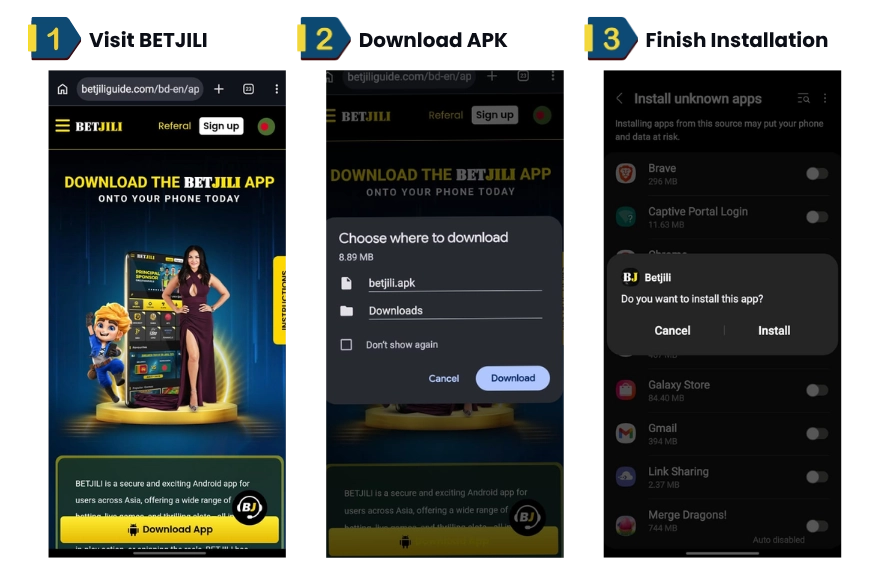
Use our download link to go to the official Betjili website and then simply tap “Download App”.
Tap “Download” in Chrome to complete the betjili apk download (8.89 MB).
Once you’ve downloaded it, just open the file from your Downloads list. Chrome may display a warning about installing the APK, so tap Settings to continue.
Enable “Allow from this source” for Chrome, then go back to the APK file and re-open it.
Tap “Install” and then, once it’s installed, just launch the Betjili app.
Installing the Betjili apk on our test Android device Galaxy S10e was fairly straightforward | Screenshot taken on 18/11/2026
Installation time: we tested the Betjili App Download APK on a Samsung Galaxy S10e (Android 12) and the whole download process took under 2 minutes over Wi-Fi. It took about a minute more when we switched to Grameenphone 4G mobile data.
The phone initially stopped the installation as Chrome didn’t have permission to install apps from outside the Play Store, but once we’d enabled that in the settings we were able to go ahead and install the app without any further problems.
Note: Only download Betjili app from the official site: the genuine Betjili APK install is 8.89MB, so a file of a significantly different size is a clear red flag. For other options, have a look at our Krikya mobile app guide or check out how the install process compares in our Baji app download guide.
How to Add a Betjili App Shortcut (PWA)
A PWA is a website shortcut saved to your home screen that opens like an app. It downloads no files, so it uses almost no storage.
Adding the Shortcut on iOS Devices
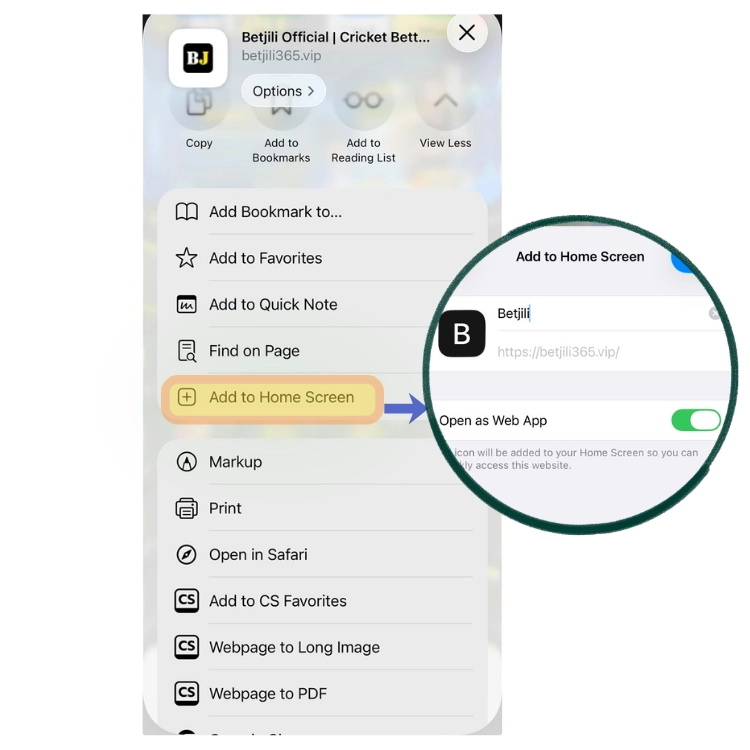
Open Betjili’s official website in Safari and tap the Share icon.
Select “Add to Home Screen’
Leave the name as “Betjili” and keep “Open as Web App” ticked.
Tap ‘Add’, and the Betjili icon will now appear on your home screen.
iOS users can add a shortcut to home screen and set it to open as Web App | Screenshot taken on 18/11/2026
Adding a Home Screen Shortcut on Android
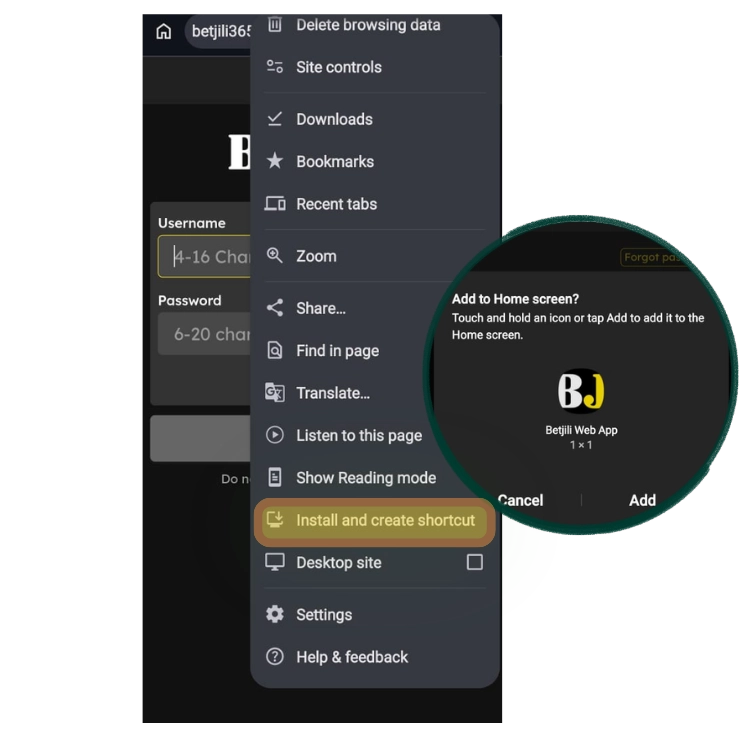
Open the official site in Chrome and tap the three-dot menu.
Tap “Install and create shortcut.”
Keep the name “Betjili,” tap “Add,” then confirm on the next prompt.
It just takes a couple of minutes to add Betjili PWA via Chrome | Screenshot taken on 18/11/2026
Now you have two options: get the Betjili download APK latest version and install the file, or add a shortcut to the mobile website via the browser. The comparison below helps you make the right decision.
Betjili App vs Mobile Website
Both versions open the same sports and games. We ran them side by side on one Wi-Fi connection to see what actually changes.
User Interface
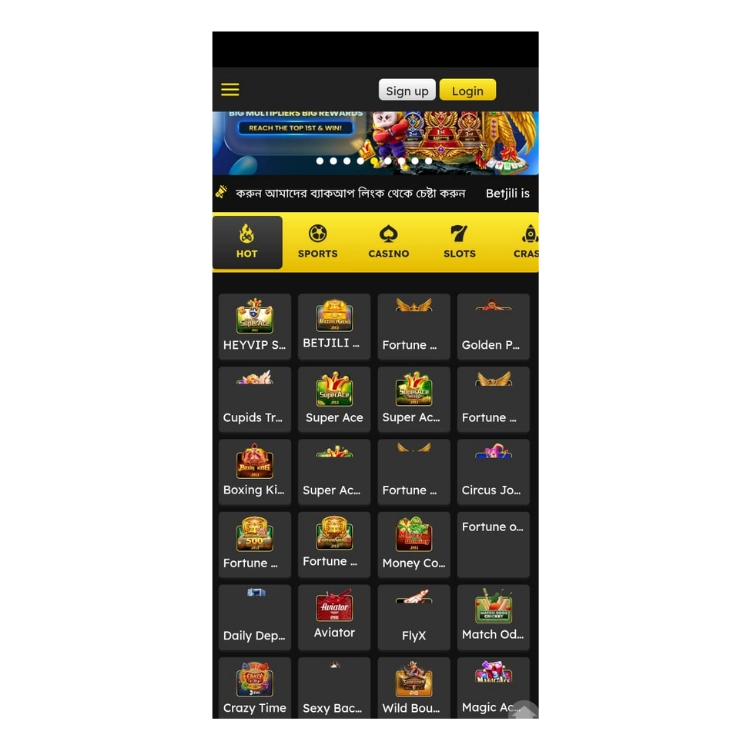
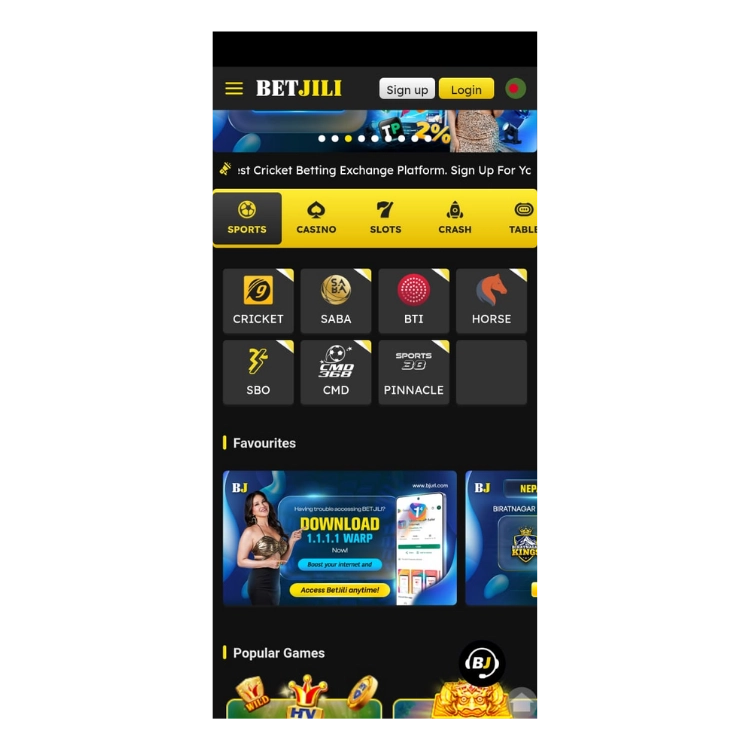
The Betjili app features a tiled user interface that offers many casino games, with top titles highlighted in the Hot Grid. When you open the app, you’ll see the Hot Games section right away. Sports, Casino, Slots, and Crash are all listed at the top. The side menu has Table, Lottery, Fishing, and Arcade.
Every section is within two taps of the home screen. Cricket is first up in the Sports section, and on our Samsung Galaxy S10e we found switching between the top tabs was easy enough to do with one hand.
The Betjili app features a tiled user interface with top casino titles highlighted in the Hot Grid | Screenshot taken on 18/11/2026
Live Betting
We ran the same match on both the app and the mobile website and found that the app updated its odds about every 3 seconds, and the website every 5 seconds.
That may not seem like a huge difference, but in a live match where the odds keep fluctuating all the time, even a few seconds could make a world of difference. The app is clearly the more sensible option in that scenario.
Pre-match bettors won’t really notice.
Performance
We ran both versions on the same Wi-Fi on a Samsung Galaxy S10e. Timed from tapping on the Sports tab until the Cricket match list with the live odds was fully populated. The app took 30 seconds. The mobile site took 45 seconds to get the same odds.
Minimum Space Required
The app takes about 77.67MB once installed, while the mobile site needs no storage at all. I downloaded it on a Grameenphone 4G connection in under a minute. That makes a real difference to users with limited phone storage and those on restrictive data plans, especially on budget phones.
After looking at both options, we think the Betjili app download is worth the time and hassle. The native app works much better than the mobile website. Here’s what we noticed inside the app.
Top Features of the Betjili App
We tested the Betjili app on a Samsung Galaxy S10e in Nov 2026, opening up each tab to see how the various features worked.
Four things stood out during our testing: the small download size, the seven sports providers in one tab, the nine game categories two taps from the home screen and the distinctive Bengali interface.
Takes Up Little Space on Your Phone
At 8.89MB, the Betjili APK is a lot lighter than Linebet’s 47.68MB file, so it’s a far more data-efficient download. We got it down over Grameenphone 4G in under a minute, which makes it a very viable option for people with limited data or storage. The installed app itself is 77.67MB so make sure you have sufficient free space on your phone before you go ahead and install it.
Seven Sports Providers in One Place
Cricket, SABA, BTI, Horse, SBO, CMD and Pinnacle are all under the Sports tab with no need to go back to the home screen to switch between providers. Cricket is first so fans have instant access to their matches.
Betjili sportsbook is broadly split into 7 categories | Screenshot taken on 18/11/2026
Quick Access to Nine Game Categories
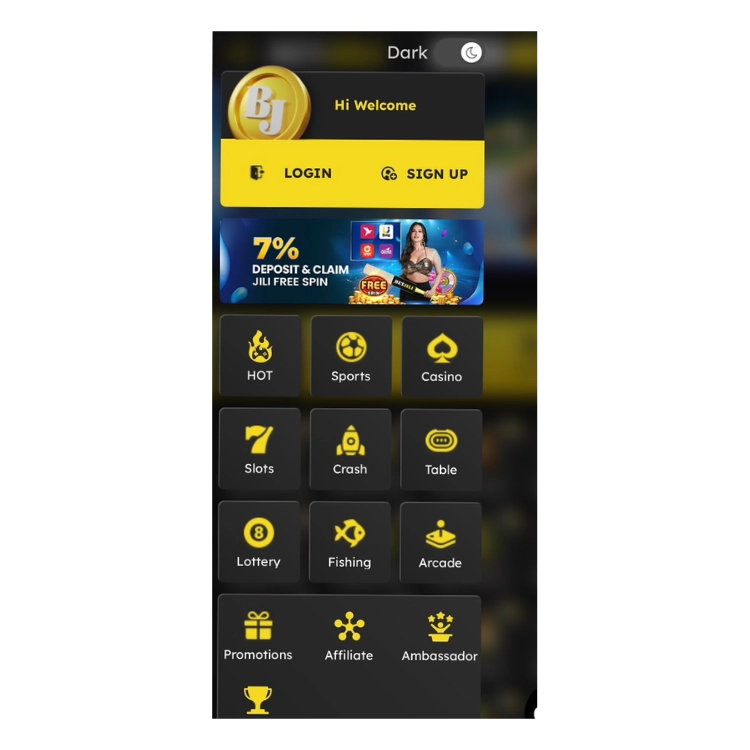
The side menu has nine game categories within two taps of the home screen (Slots, Crash, Lottery, Fishing and Arcade to name a few). Promotions and the Winner Board are both just below the game categories, so you can easily check out the offers without having to go to separate pages. The layout works well one-handed, as you can move between games without having to go through several layers of menus.
Besides Sports, Betjili offers several other categories to choose from, such as crash, casino, slots, and lottery | Screenshot taken on 18/11/2026
Bengali Language Support
The home screen has Sign Up, Log In, Sports, and Casino in Bengali, which helps the Bangla-speaking user to get to the bits they’re interested in much more easily. You can change the language by simply tapping the flag in the top right and picking from the drop-down menu. That makes it much easier for someone who is more comfortable reading in Bengali to go through the registration process.
How to Register on the Betjili App
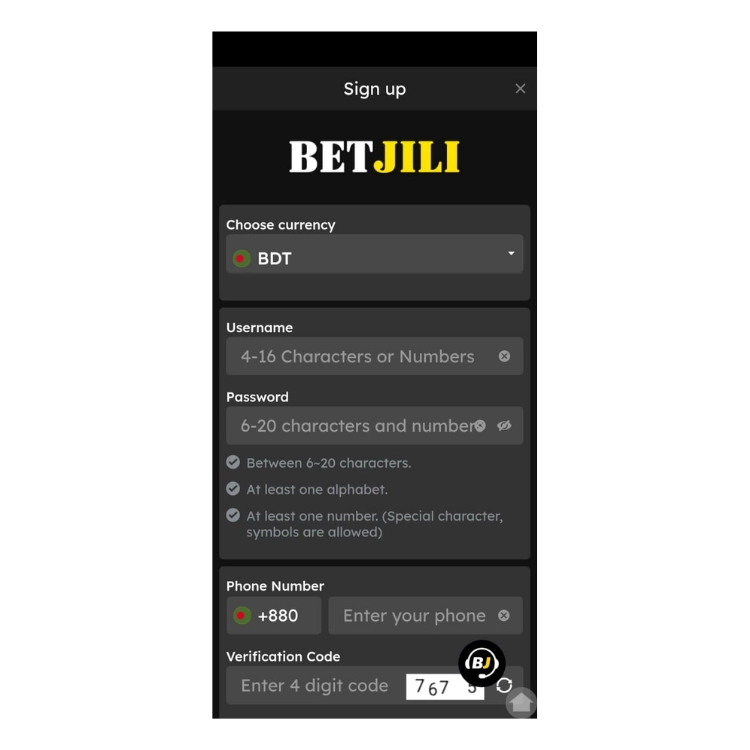
Betjili app registration took us less than two minutes to complete.
Open the app and tap “Sign up”.
Keep BDT selected as your currency.
Enter a username of 4 to 16 characters.
Set a password of 6 to 20 characters with at least one letter and one number.
Add your +880 phone number, type the 4-digit code shown, and submit.
Betjili offers no sports welcome bonuses at the moment, but there are a couple of casino welcome offers, one for slots and one for crash. We also came across a 7% deposit offer with JILI free spins in the app menu.
No matter which one you end up picking, always make sure you read the bonus terms prior to making a deposit, as you’ll want to be fully aware of the wagering requirements.
Betjili is for players aged 18 and over. Set a deposit limit before you play and treat betting as entertainment, not a way to make a quick buck.
Should You Download the Betjili App?
Yes, it’s definitely worth a look mainly because Betjili brings a lot of special features to the table and it’s quite unique compared to other betting sites in Bangladesh.
It’s fairly light, offers a clean and uncluttered layout for better navigation and provides quick access to the live odds. Plus, the Bengali interface with the all labels showing in local language make things a lot easier for the Bangla-speaking user.
On our test unit (the Samsung Galaxy S10e) the APK installed in under 2 minutes and the live odds page loaded in 30 seconds over Wi-Fi. The options on the Sports tab were well laid out and using them was a no-brainer, with Cricket at the top and seven providers available without you having to go into different sections.
Our tests did, however, show that the APK has to be installed manually as it’s not available on Google Play. iPhone users are left with a home screen shortcut rather than a native app. That said, you do need to take a bit of care in order to find the official download page and then actually install the APK.
Ramanathan manages content for Football Whispers India and Bangladesh, drawing on extensive experience reviewing bookmakers and their offers for multiple geos. With contributions to MyBettingSites and TheTopBookies.com, he combines personal insights with expert analysis to deliver a balanced take on operators and sports betting.
Tap ‘Download Betjili App‘ on this page to head to Betjili’s official site. Then, navigate to the Betjili app download page and tap ‘Download Now.‘
The APK will download, and you can then open that file and go through the installation process. iOS users can go to the mobile site via Safari and just add a shortcut to their home screen.
The safest option is to download directly from Betjili’s official website. Any APKs that are hosted elsewhere could have been tampered with, so be very wary of those. The one we tested was 8.89MB. If you come across one that’s a significantly different size from that, then check the source before you go any further.
Tap “Sports” and select ‘Cricket”.
Choose a match and tap the odds for your selection.
Open the bet slip and enter your stake.
Review your selection and then tap “Place Bet” to confirm.
Betjili doesn’t appear to have an official archive of previous APKs. You might be able to track down older versions on third-party sites, but it’s very difficult to know for sure that those are genuine. Our recommendation would be to just use the most recent file available on the official site.
The Betjili download apk latest version as of November 2026 is 3.2.1. Go to Betjili’s official download page to see if a newer version has since been released.
We couldn’t find a standalone lite edition during our review. The regular Android APK is actually quite small at 8.89MB. You can also use Betjili via your phone’s browser if you don’t want to install anything.