You can get BC.GAME on your phone either by downloading the Android APK from the official BC.GAME website, or by adding the mobile website to your iPhone home screen as a Progressive Web App (PWA).
We tested the Android app on a Samsung S10e running Android 12. The APK downloaded and installed in about 2 minutes on Wi-Fi, and the dashboard opened in about five seconds.
Below, we cover the BC.GAME APK download and iOS shortcut setup steps, key specs of the app, and the features to check before installing.
After you install the app, use our BC.GAME bonus code for Bangladesh during registration to claim the latest welcome offer.
BC.Game APK Download: Key Specs
BC.GAME App BD
Android Devices
iOS Devices
Latest App Version
5.5.4
Just the PWA Shortcut
File Size
19.98 MB
No download necessary
OS Compatibility
Android 5.0 or higher
iOS 14.0 or higher
Storage Space
65.84 MB
NA
RAM Requirement
2 GB or more
No Specification
Before downloading the BC.GAME APK, check the app details below to make sure your device meets the requirements and has enough storage space for installation.
When we tested the BC.GAME APK the latest version available was 5.5.4 and the app we had installed was 65.84 MB on our Android device. The iOS App Store listing for this region isn’t accessible from Bangladesh, so the iOS specs above are based on official information from BC.GAME.
BC.GAME APK Download for Android: Step by Step
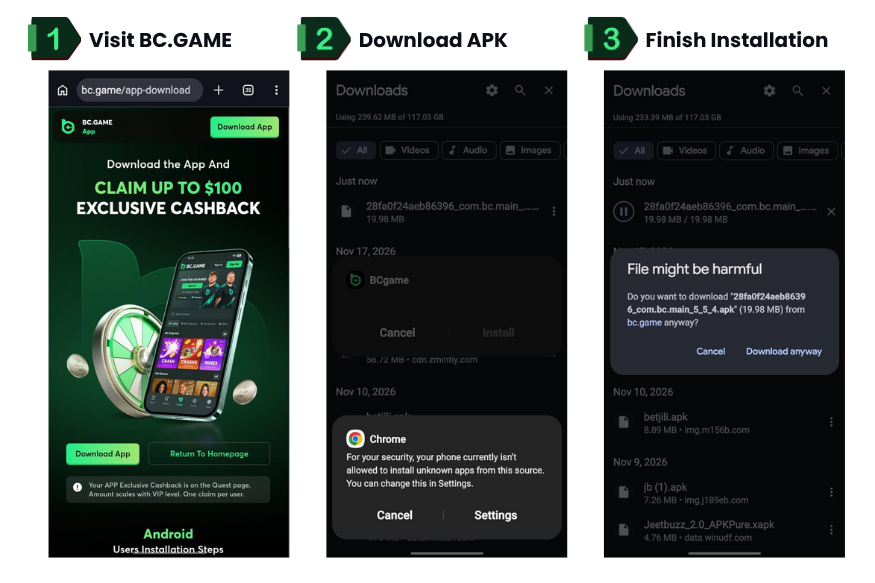
This illustration shows how to download the BC.GAME APK on a Samsung Galaxy S10e Android device | Screenshot taken on 26/11/2026
Tap the ‘Download BC.GAME APK’ button on this page to visit the verified BC.GAME Bangladesh website.
On the landing page, tap ‘Download App’ to begin APK download.
When Google Chrome displays a security warning, tap ‘Download anyway’ to proceed.
Open the downloaded file. Then go to Settings > Apps > Special app access > Install unknown apps, select Chrome, and toggle on Allow from this source.
Return to the prompt and tap Install to finish the installation process.
Tap Open when you see ‘App installed’.
On a Samsung Galaxy S10e running Android 12, the APK downloaded and installed in about 2 minutes on a 100 Mbps Wi-Fi connection. With Grameenphone 4G mobile data, however, it took just over 2 minutes and 30 seconds.
Adding the BC.GAME PWA on Android and iOS
A PWA adds a website to your phone’s home screen and lets you use it in a full-screen window. It works much like a native app, but you don’t need to download anything from the App Store or install an APK.
Adding the PWA on iPhone
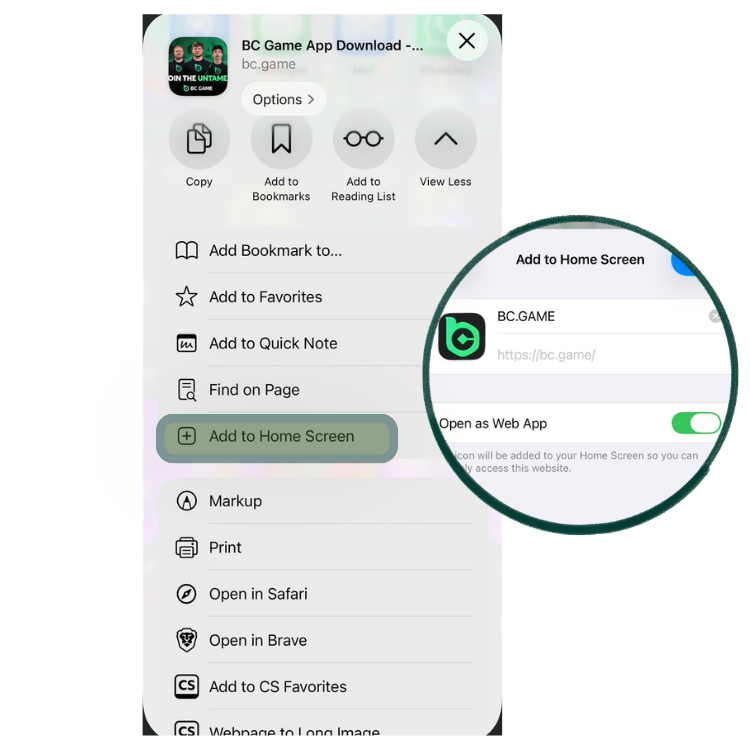
The BC.GAME iOS app isn’t available on the Bangladesh App Store, and using a VPN to change your region won’t help. Instead, you can add BC.GAME to your iPhone’s home screen as a PWA via Safari. Here’s how.
Open BC.GAME in Safari and tap the Share button.
Tap Add to Home Screen. Make sure ‘Open as Web App’ stays on, then tap ‘Add’.
Tap the new BC.GAME icon on your home screen to launch it.
iPhone users can set up BC.GAME to open as a Web App on Safari in just a couple of steps | Screenshot taken on 26/11/2026
Adding a Home Screen Shortcut on Android
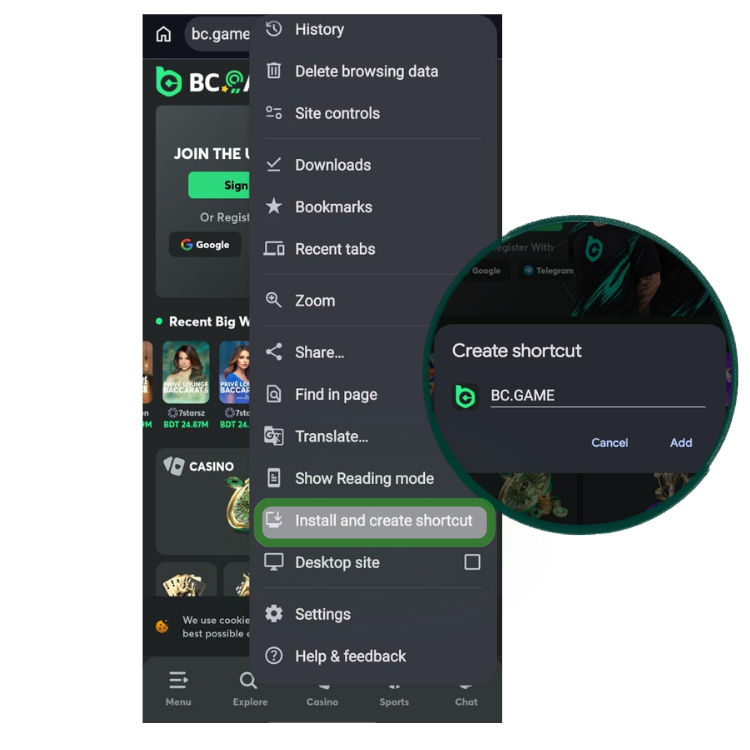
Open BC.GAME in Chrome.
Tap the three-dot menu and choose ‘Install’ and create shortcut. Some devices may show ‘Add to Home screen’ instead.
Tap ‘Install to confirm’.
Adding BC.GAME mobile website shortcut to the home screen | Screenshot taken on 26/11/2026
Now, let’s see how the mobile website and the browser shortcut stack up against the full Android APK for features, usability, and performance.
BC.GAME App vs Mobile Website: Which One Should You Choose?
We tested the Android APK, mobile website, and a plain browser shortcut on the same Samsung S10e running Android 12 to see how they perform.
Parameters
BC.GAME APK App
Mobile Website
Browser Shortcut
User Interface
Full screen, no browser bars
Address bar and tab counter stay visible
Opens in Chrome, so browser bars stay
Live Betting Experience
Live tab with score line and odds
Same sportsbook, less screen space
Same as website
Storage Space
65.84 MB
None
Almost none
Speed
Dashboard opens in about 5 seconds on Wi-Fi
Dashboard opens in 5 seconds
Dashboard in 5 seconds
Push Notifications
Native app alerts even when the app is closed or running in the background
Typically depends on mobile browser settings
Typically depends on mobile browser settings
Quick access
One-tap launch
Bookmark or typed URL
One-tap launch
Updates
Download the latest version of the BC.GAME APK as soon as a new update is available.
Updates itself
Updates itself
Mobile data usage*
~75 MB in 10 minutes
~175 MB in 10 minutes
~175 MB in 10 minutes
* To see how much data Grameenphone 4G Mobile uses, we ran a live stream for 10 minutes. The results were clear. The app used less data than the mobile website, yet the stream still played in high quality.
User Interface
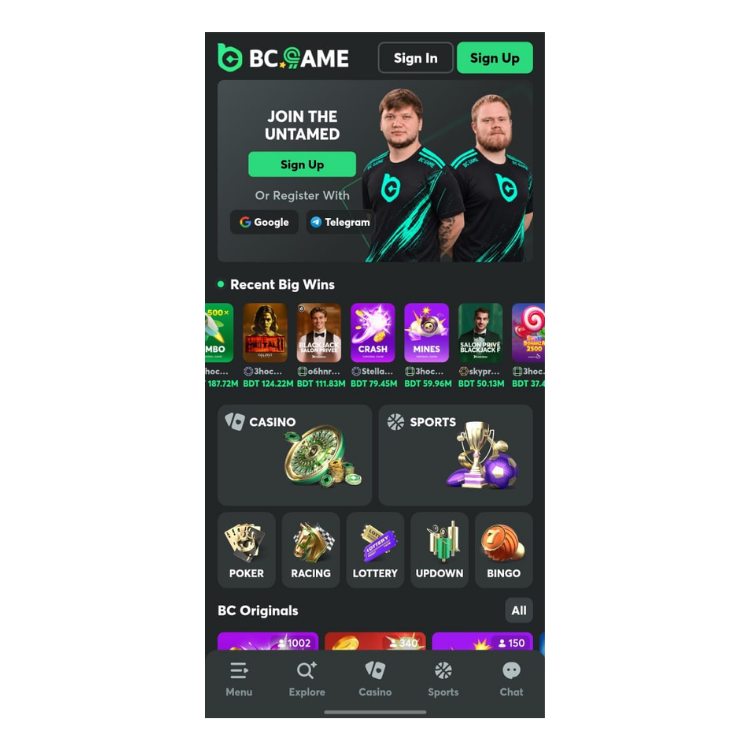
The Android APK gives you a full-screen layout without Chrome’s address bar or tab counter. The mobile website and browser shortcut keep the browser bars in view, but all three use the same bottom navigation bar with Menu, Explore, Casino, Sports, and Chat.
BC.GAME home screen interface | Screenshot taken on 26/11/2026
Performance
Load speeds matched up in testing. The dashboard opened in about five seconds on Wi-Fi for all three, so the APK does not have a clear speed advantage in this aspect.
Live Betting
Each option gives you the full sportsbook, including live scores and odds. The APK’s clear screen means you get a bit more space to keep up with matches as they happen.
Minimum Space Required
The APK takes up 65.84 MB. The mobile site uses no storage, and the shortcut uses negligible space. If device storage is tight, check out our JeetBuzz app download guide for another lightweight choice.
Quick Access
The APK and the shortcut both open with a single tap. The mobile site needs a bookmark or manual URL entry. Those who like browser-based play can check our top-rated Bangladesh betting sites or Betjili APK guides.
Our recommendation: Pick the APK if you want lower data usage (75 MB vs 175 MB in 10 minutes) and a full screen layout, or the mobile website if your phone is short on storage, as load speeds were the same.
Key Highlights of the BC.GAME App
Four things stood out for us when we checked the BC.GAME app: ComboBoost on cricket accumulators, Cwallet login, the BDT balance with local cricket coverage, and the app-only cashback.
ComboBoost on the Bet Slip
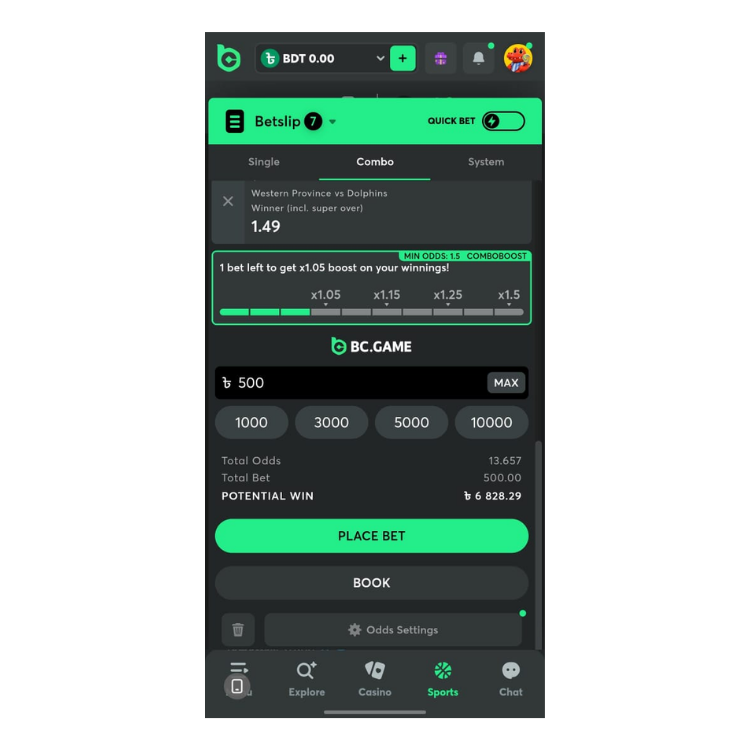
When you’re making a cricket accumulator, a ComboBoost meter appears on your bet slip and tells you how much your payout increases with each extra pick. You can see the boosted payout before you bet. For instance, if you add a selection at 1.50 or above you might get a 1.05x boost. We went as high as 7 selections on our slip, staked BDT 500 at 13.657 total odds and saw a potential return of BDT 6,828.29.
BC.GAME bet slip with seven picks with the combo boost applied | Screenshot taken on 26/11/2026
Cwallet Login
Other than the standard email sign up you can just log in via Google, Telegram or Cwallet. We believe signing up with the Cwallet account has its advantages. You get a unified account that gives you instant access to theBC.GAME platform, options to convert fiat to stablecoins such as USDT (Tether) and USDC (USD Coin), and fee-free deposits and withdrawals.
BDT Balance and Local Cricket Coverage
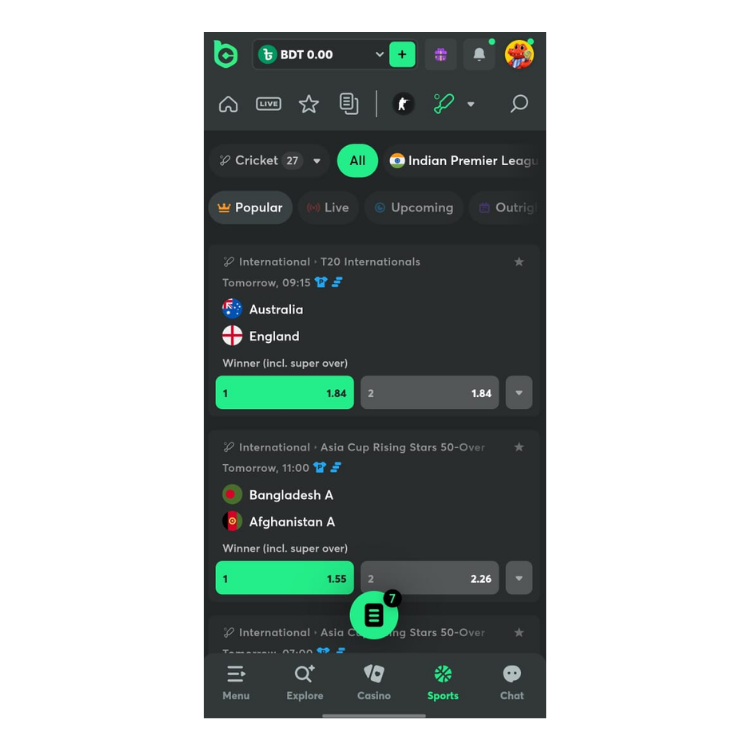
The balance is shown in BDT straight away so no currency conversion is required. There’s no Bangla support per se, but the cricket section is very deep, with as many as 27 live events at the time of our testing.
We were quite impressed by the quality of the local cricket coverage, actually with half a dozen domestic cricket games available to bet on, including a Bangladesh A v Afghanistan A game. Anyone after an app with a full Bangla interface will certainly find the Krikya app or the Betjili mobile app a much better option.
The cricket section on BC.GAME showing local Bangladeshi domestic fixtures | Screenshot taken on 26/11/2026
App-Exclusive Cashback
The bookmaker provides a one-off, app-only cashback offer of up to 12,500 BDT ($100) via the Quest page. The amount you receive, however, depends on your VIP level. Once you’ve installed the BC.GAME app, go to that section to check which level you are on and whether you’re eligible for the offer.
The BC.GAME app doesn’t have those fancy mobile-only features like 1xSwipe you get with 1xBet, but honestly, it still does the job. If you’re after something that lets you place bets fast and gives you loads of markets to pick from, you might want to check out our 1xBet app download guide.
How to Sign Up After Installing the BC.GAME APK
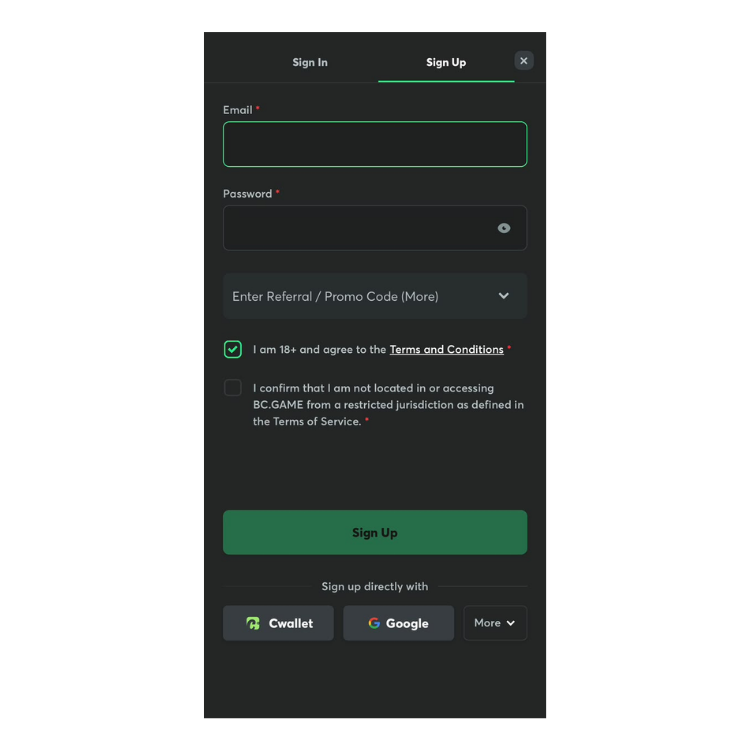
BC.GAME app sign up form showing the promo code field | Screenshot taken on 26/11/2026
Open the BC.GAME app and tap Sign Up.
Enter your email address and make a password. Alternatively, you could sign up directly via your Google, Cwallet or Telegram account.
Expand the Referral / Promo Code field if you have a code and enter it to unlock the current welcome offer.
Tick the 18+ and Terms and Conditions box and then tap Sign Up.
Last time we checked, BC.GAME didn’t have a matched deposit bonus, but Melbet does if that’s what you’re after. Want to find out more about the Melbet app? Have a look at our Melbet apk download guide to see how it stacks up.
Note: Once you’ve logged in, check the Quest page in the app for the one-off app exclusive cashback offer referred to above.
Should You Download and Install the BC.GAME APK?
Yes, if you place most of your bets on mobile and use Android. The BC.GAME Android APK is lightweight and takes up minimal storage after installation, yet gets the job done.
The app opened in about five seconds in our test, the same as the mobile website, but it runs full screen and gives one-tap access to the BC.GAME platform, where you can find 35+ sports categories and 10,000+ casino games, all in one place.
During testing, the live streams ran smoothly. We ran a test where we streamed Bangladesh A vs Afghanistan A for 10 minutes and then switched from Wi-Fi to Grameenphone 4G mobile data mid-stream. The feed picked up almost immediately with no lag and no buffering whatsoever.
Push notifications for any active bets, previously saved fixtures, and new promotions worked well, too. All it took was just a couple of taps to hop across to the right page from the lock screen.
But the BC.GAME app does have its fair share of downsides.
With Google Play Store restricting betting apps in Bangladesh, you’re effectively left with sideloading the APK as the only way to get and install the app – which is not ideal at all. Updates have to be done manually as well. So, it’s not perfect.
Rating 🌟4 out of 5.
Pros
+
The light 19.98 MB APK, about 65.84 MB once installed, fits easily on budget Android phones
+
One-tap launch offers quick access, and saved sessions keep you logged in
+
Customisable push notifications for active bets, favourite events, and promotions
+
One-time, app-only exclusive cashback of up to 12,500 BDT via the Quest page
Cons
-
Not listed on Google Play, so it requires sideloading and manual updates
-
No native iOS app available in Bangladesh (PWA only)
Pritthijit Ray has 6+ years' experience in sports betting, with a focus on football and cricket. His passion for football is evident in his posts that blend robust knowledge of the game with genuine insights. Fluent in English, Hindi, and Bengali, Pritthijit brings depth and credibility to his bookmaker reviews and promo code analyses, ensuring they're informative, unbiased, and relevant.
Yes, it’s safe when you download it directly from the official BC.GAME website or an official mirror, not from third-party APK sites. Chrome may show a security warning as the file is sideloaded outside of Google Play.
BC.GAME is operated by Twocent Technology Limited. They’ve got a license from the Government of the Autonomous Island of Anjouan, with the number ALSI-202410011-FI1 if you want to check.
No, the BC.GAME app wasn’t available on the Bangladesh App Store during our testing and switching regions via a VPN didn’t unlock it. iPhone users can add the PWA to their home screen in Safari for a full-screen app experience.
The standalone APK file is 19.98 MB. Once installed, it uses about 65.84 MB of storage on your device.
Yes, you can download and install the APK for free. You only need to add funds to your account if you want to place real money bets in the sportsbook or casino.
Head over to the Sports section and pick a sport of your choice (e.g. Cricket).
Tap the odds for your selection (e.g. Australia to win at 1.84).
Open the Betslip and select Single, Combo or System.
Enter your stake, check the Total Odds and Potential Win, and then tap ‘Place Bet’.