Looking for a Stake APK Download? As of November 2026, Stake doesn’t host any APK files you can download on its official website.
You can only install the Stake Progressive Web App (PWA) on Android or iOS, which places a shortcut to the mobile website on your home screen.
We tried the mobile site on two devices: a Moto G67 (Android 16, Chrome) and an iPhone 16 (Safari). We also checked how the Stake PWA app performed in general and compared it to the desktop version to see which one comes out on top. In addition, we created a new Stake account to see what signing up with the PWA is like.
Below, we'll walk through how to add the Stake home screen shortcut on both Android and iOS, install the PWA, and claim the welcome offer using the Stake referral code WHSMAX.
Note: 18+. Set deposit limits. Gamble responsibly. Most importantly, never chase your losses.
Is There an Official Stake App India for Android or iOS?
No. We combed through the official Stake website and found that there is no Stake app you can download.
We also checked the Stake Community to find out why that was the case. And that’s when we found out that Stake being a casino app has its own challenges getting listed on the Play Store or App Store for India owing to their anti-gambling policies.
A lot of betting sites in India however host APKs on their own site, but Stake doesn’t for obvious reasons that it could pave way for mirrors and clone apks. However, after exploring the mobile site, we think there is no need for an app, as stake.com works perfectly in a browser.
Perhaps you were searching for ‘Stake India app download’ or ‘the Stake APK latest version’ and found one that looked official. It isn’t, and the only safe way to get Stake on your mobile is to add stake.com to your home screen.
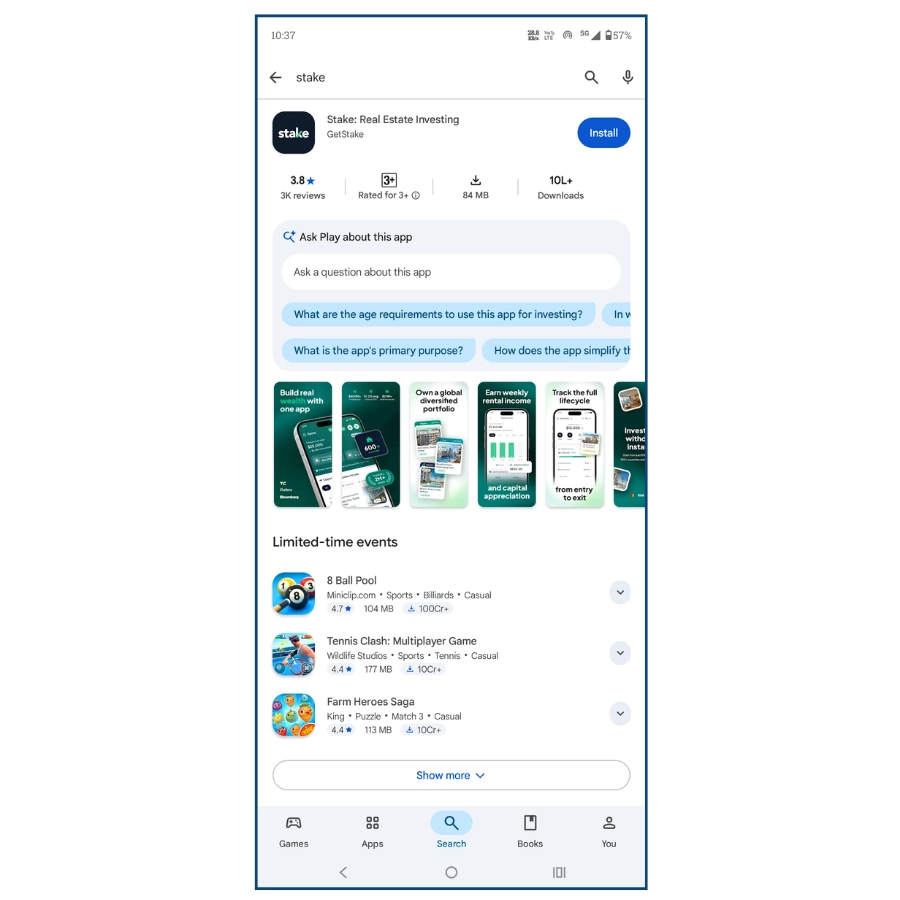
When we looked for the Stake app on Google Play Store in India, we found a totally unrelated app with the same name | Screenshot taken on 19-11-2026
How to Add a Stake PWA App or a Shortcut Safely?
There is no Stake apk download for Android, but you can install the Stake.com PWA or add a home screen shortcut.
And it will work much like an app, apart from biometric login and push notifications. That way, you can avoid the risks of downloading dodgy third-party Stake APKs, and you don’t have to grant any extra permissions on your Android phone.
You’ll also always be on the latest Stake version without needing to update.
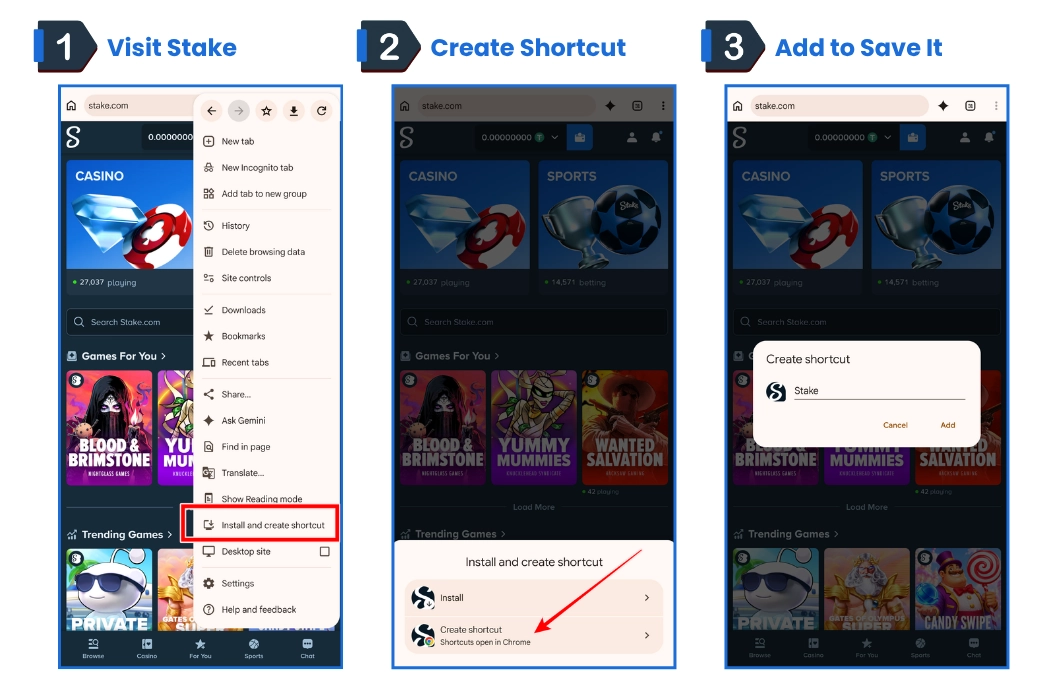
It just takes a few seconds to install the Stake PWA app or set up a shortcut on your phone | Screenshot taken on 19-11-2026
Adding a Stake Home Screen Shortcut via Chrome
Follow these steps to install the Stake shortcut on your Android device.
Tap our link to visit Stake’s official website on Chrome.
Tap the three dots in the top right corner, then select the option to install or create a shortcut.
Choose ‘Create shortcut’. Depending on your Chrome version, you may see a pop-up called ‘Create shortcut’.
Type ‘Stake’ as the shortcut name and tap ‘Add’.
You should now see a shortcut on your home screen. On our test device that took around 40 seconds. If you don’t see the prompt then just refresh the page and go through the steps again and the prompt should appear.
Installing Stake PWA on Android
Here’s how to install the Stake App (PWA) on your Android phone.
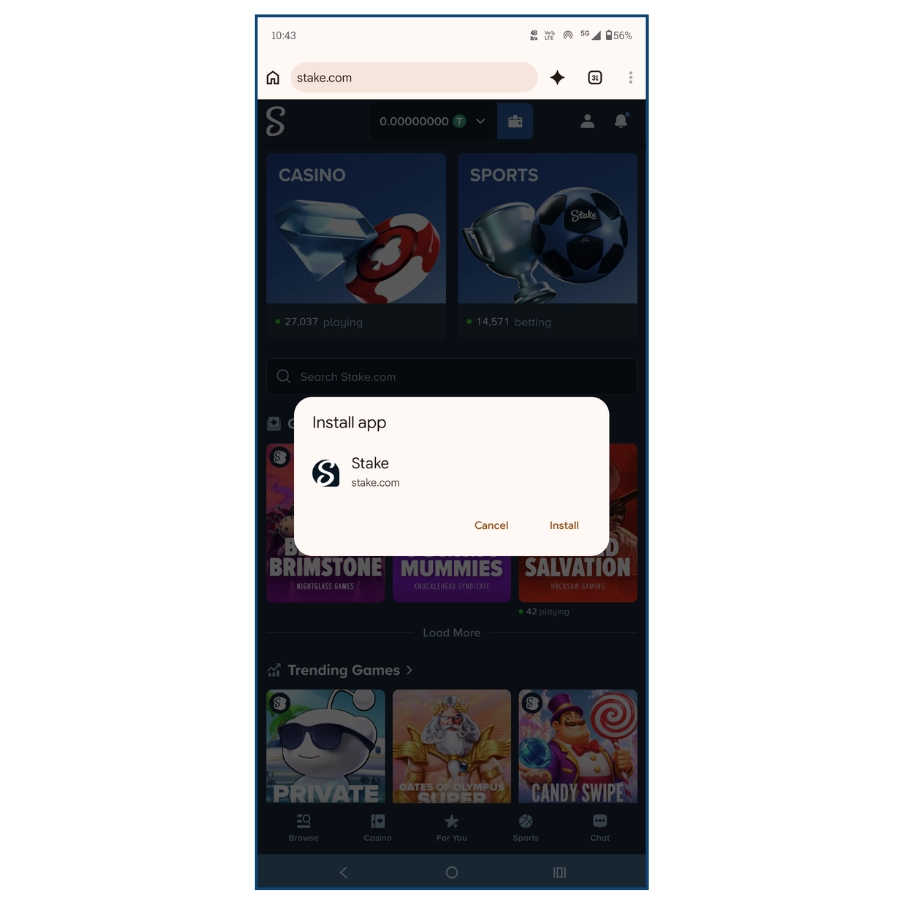
Follow steps 1 and 2 of the guide above, until you get to the point where you can install and create a shortcut.
When the popup appears just tap ‘Install’. You may need to tap ‘Install’ again to confirm.
Once it’s installed you can start using it.
The Stake PWA is a good alternative to the Stake APK | Screenshot taken on 19-11-2026
Note: Neither option is an official Stake app; both open stake.com. The only difference is that the home screen shortcut opens in your browser, whereas the installed web app gives you a cleaner, more app-like experience. Everything else (page loads, games etc) is the same. Go ahead and try whichever version you like.
Adding a Stake iOS Shortcut via Safari
Adding a Stake shortcut on iOS takes about the same amount of time.
Open Safari and go to stake.com. When the page finishes loading, tap the Share button (the square with an arrow at the bottom of the screen).
Scroll down and choose ‘Add to Home Screen’. Save the name as Stake, and then tap ‘Add’ in the top right corner.
When you open the site, it will launch in Safari. This feels much more organized than having 20 tabs open, and it’s more streamlined.
3 Key Things to Do Before Adding a Stake Shortcut
Delete Fake Stake APKs if You've One
Completed a Stake APK download from a 3rd party site? Remove it immediately and run a Play Protect scan We strongly suggest you review Install Unknown Apps permissions and change your Stake password even if nothing appears to be amiss.
Choose the Official Stake Website
Access the right Stake domain on your phone browser. Tap the official link on this page if you want to steer clear of all the mirror and clone sites that look exactly identical.
Make your Account More Secure
Turn on 2 Factor authentication by going to Settings > Security and connecting your Google Authenticator app.
Stake Desktop vs Mobile Browser vs PWA Shortcut
Feature / Metric
Desktop Browser
Mobile Browser
Home Screen Shortcut
Layout
Wide
Single Column, Bottom Navigation
Same as mobile version. Quicker to reach from the home screen.
Sports / Casino
Full Catalogue
Full Catalogue (with load more button)
Same as mobile (One tap to open)
Loading Speed
Under 2 seconds (Home page on wi-fi)
2-3 seconds (home page on 4G Jio)
Same as mobile
Betting
Best for comparison of multiple bets
Good for single/ in-play bets
Fastest if placing regular bets
Live Stream
Live video alongside betting
Live video on top, odds underneath
Same as mobile
Log In
Remains logged in (cookies)
Remains logged in (cookies)
Remains logged in. Enable 2FA
Cashier
Top of screen (one click)
Top bar (one tap)
Same as Stake mobile website
The key difference between the Stake desktop site and the mobile website is the layout.
On desktop, you can see the categories, event details, live stats, odds, and your bet slip all at once. On mobile, all of that is in menus so you have to tap through them to get to it. The mobile site works really fine; it’s just that it might be a little confusing at first if you’re new to Stake.
5 Stake Features That Make Stake Mobile Site Worth Using
1. Live Streaming Inside the Mobile Browser
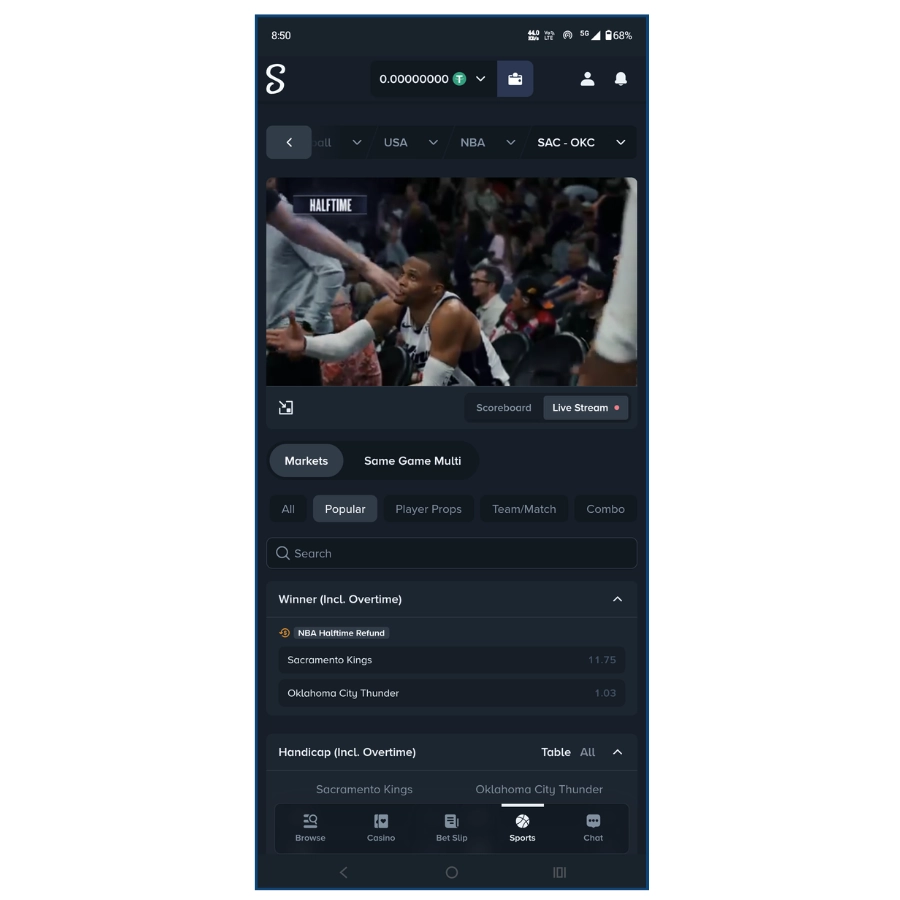
Live streams on Stake were quick to load on the mobile browser without any stuttering | Screenshot taken on 19-11-2026
I tested the stream by watching a live basketball game. On Wi-Fi it started in around 9 seconds. There was a very short delay initially when I was on mobile data but it picked up very quickly and then played perfectly with no buffering at all. The streaming works very well in general.
When the screen is in portrait mode the video stays at the top which is great for watching, just a bit annoying as you’re constantly having to scroll up and down below the video to keep up with the rapidly changing in-game odds.
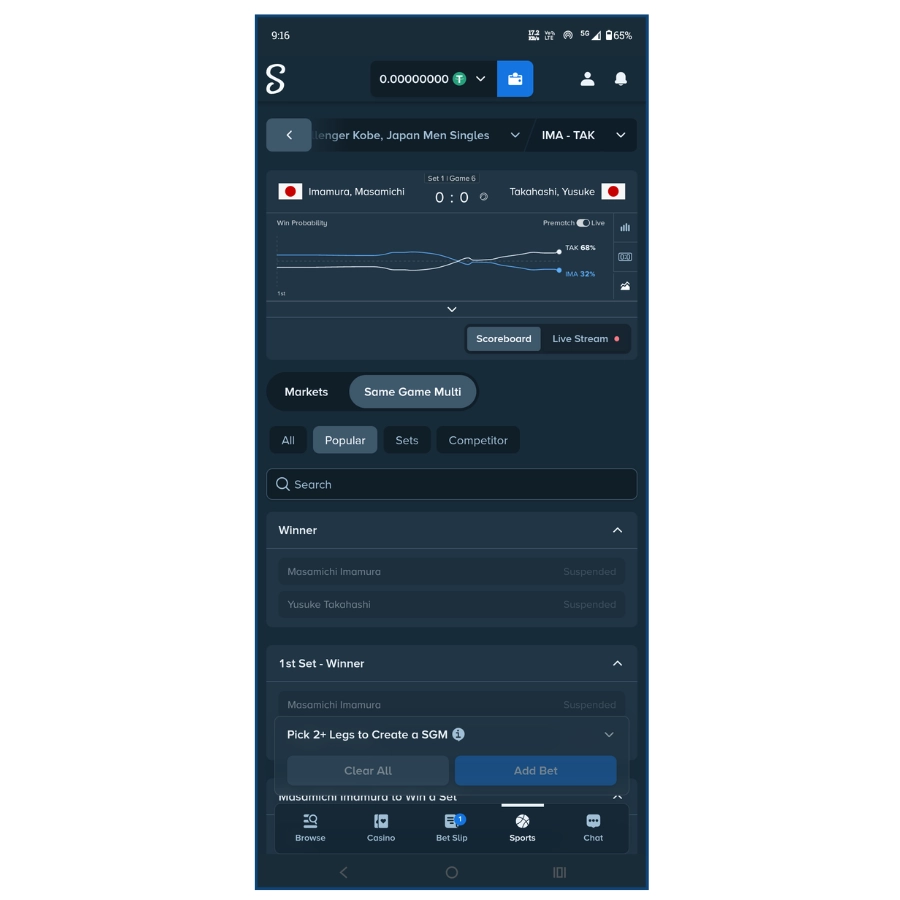
2. Same Game Multi on Football and Tennis
Same Game Multi is a truly unique feature of Stake letting you combine bets from the same game | Screenshot taken on 19-11-2026
Most bookmakers in India won’t allow you to combine multiple bets on the same game on one slip. With Same Game Multi, though, you can. This is one of the features we really like about Stake.
Stake allows users to create Same Game Multis on Football and Tennis. We put one of their tennis games to the test and added three legs to our slip. When we changed the bets around, the combined odds updated immediately and the bet slip itself updated very quickly, which was good to see, especially on a mid-range Android phone.
Meanwhile, if cricket is your main focus, compare Stake with ourCricket betting apps guide, where we look at cricket markets, app behaviour and mobile bet slips in detail.
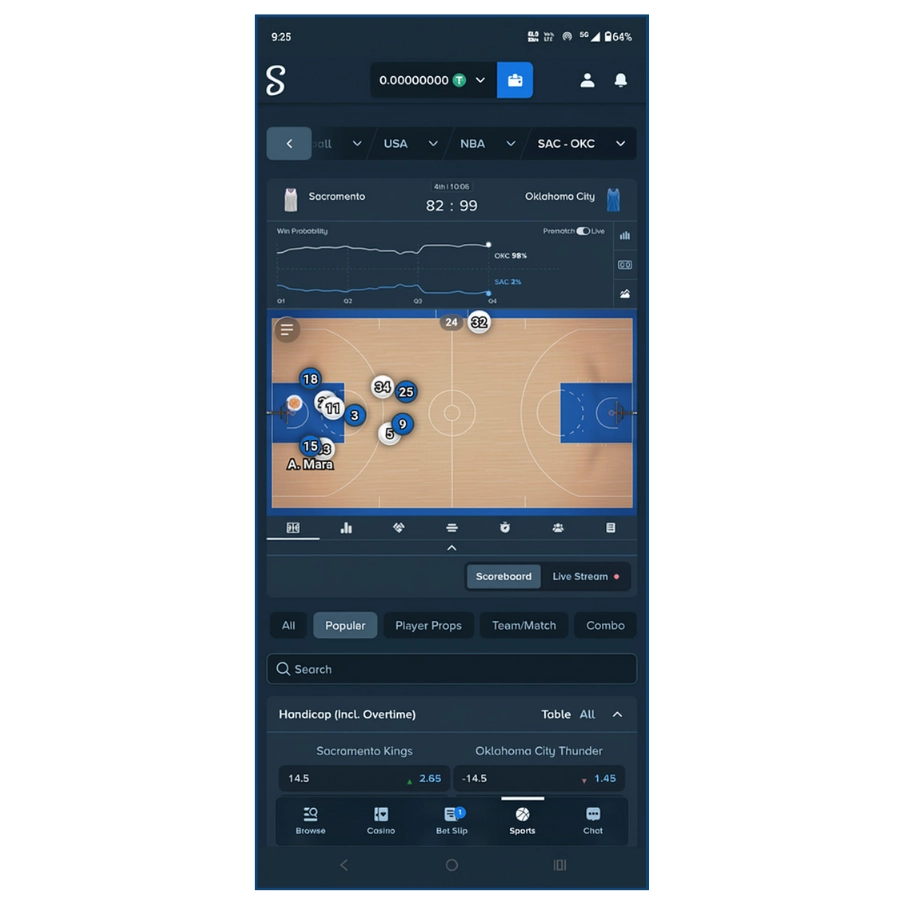
3. The Live Stats Tracker
Stake live widgets give you the right context to place bets without guessing | Screenshot taken on 19-11-2026
We reviewed a NBA game to get a sense of the live betting features and trackers available for a basketball fixture. No stream was on but the widgets let us check the key stats (attacks, momentum, shots etc). That’s useful if you’re someone who finds value bets and avoids making a random bet without any context.
You get plenty of data for big football fixtures from top-tier European leagues. For cricket games from an less popular league or a domestic competition, you only get the basic stuff, like runs and overs, and there’s nothing else, like the wagon wheel or the pitch map.
4. Buy Crypto From Within the Platform
Rather than buy the crypto on some other exchange and then move it over to Stake, you can use your wallet to buy the major coins directly on the Stake platform via third-party providers such as Moonpay or Swapped.
Buying coins this way is very convenient really, but it’s not necessarily the cheapest. Stake themselves don’t charge any fee, but the service providers will invariably add on their own processing, handling and foreign exchange fees.
When we tried that option, we could see the USDT, BTC and TRX prices were all clearly displayed, showing you exactly how much you’d be paying and how much would end up in your wallet.
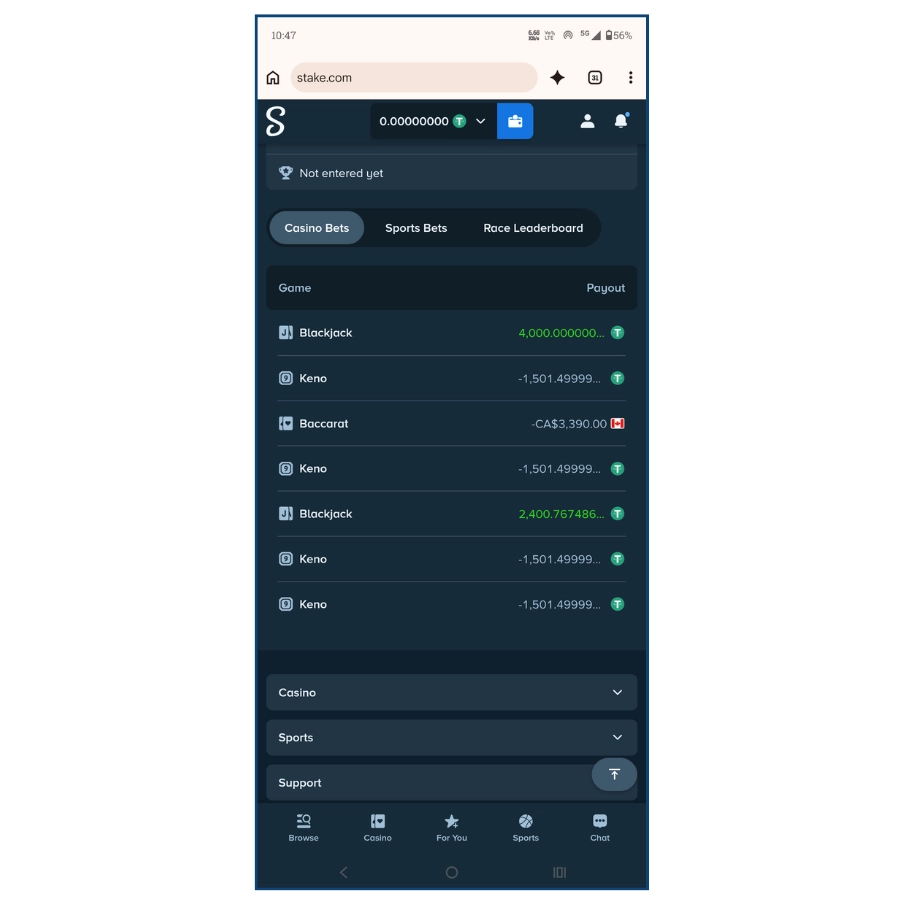
5. The Recent Bets & High Roller Feed
The Stake Bet Feed kept ticking over with bets from sports and casino | Screenshot taken on 19-11-2026
Stake’s high roller feed shows what other players are betting on, often with large sums. Treat it as a view of what is popular, not a tip to follow. We looked into which sports and casino games are most popular. Blackjack and Keno were the most popular on the casino front, while a live ODI match between India and New Zealand drew several massive sports bets.
Stake PWA Registration and Login
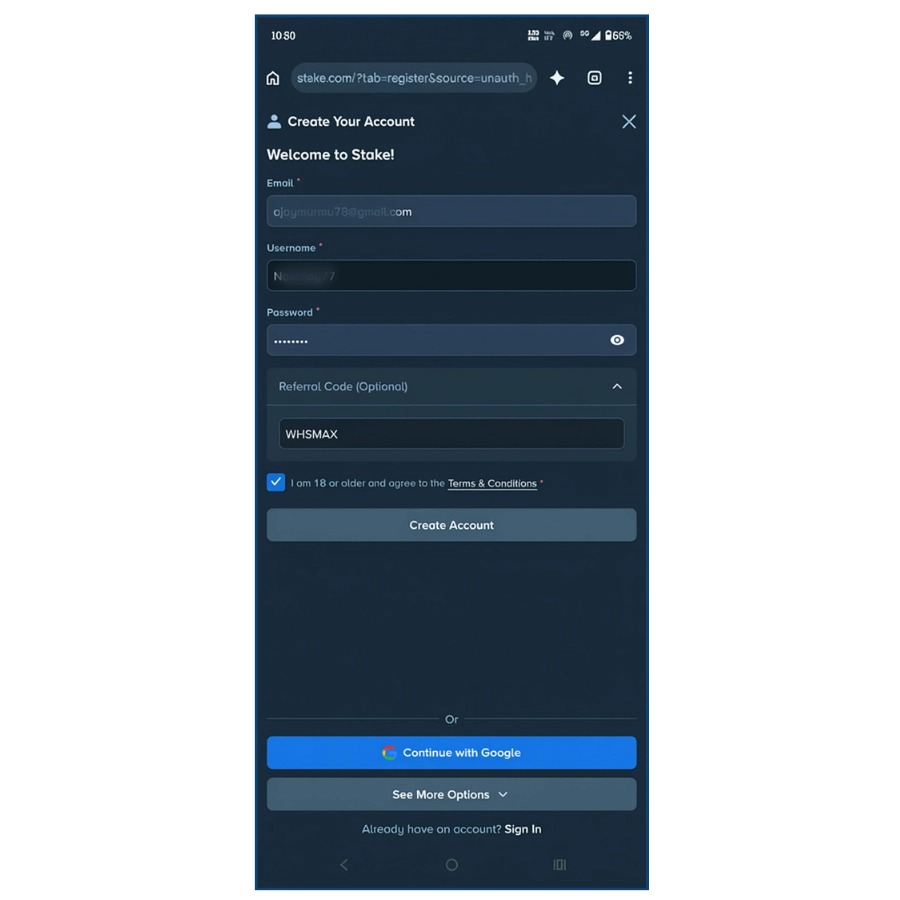
Tap the blue ‘Register’ button at the top of the home page.
Enter your email address, choose a username, and set a secure password.
Add WHSMAX in the referral code field to unlock the latest welcome bonus offer from Stake.
Tick the box to confirm you’re 18 or over, agree to the terms, and then click ‘Play Now’.
The Stake PWA app referral code WHSMAX unlocks a huge 200% welcome offer | Screenshot taken on 19-11-2026
Logging into the Stake India website is fairly straightforward with the shortcut: tap open the Stake shortcut icon on the home screen of your phone, tap sign in, and enter your credentials to get instant access to Stake.
As far as KYC is concerned, you can access the site without restrictions, check the betting markets and odds, place bets without having to verify your identity at all. However, in some instances, you will be asked to verify your identity.
When you make a real money deposit or request a withdrawal.
When you’re using fiat currencies, third party services such as Moonpay or any crypto network.
During routine random compliance checks.
It’s a good idea to have a clear photo of your Gov ID or proof of address handy. This way, you can make deposits and withdrawals much quicker and avoid any delays.
Verified Stake Alternatives with an Android APK
Here are some operators that do provide APK files which you can download directly from their sites.
If you prefer a simple and secure option to access Stake, you have got to add the Stake PWA or create a shortcut on your home screen. However, if you’re after a pure-play mobile betting experience via a native app, check out any of the options from the table below.
Operator
App Download Links
Android APK
iOS
Notes
BC.Game
Official Link
Yes
No
Easily accessible as the download button is on the front page. Also offers a desktop app for Windows.
1win
Official Link
Yes
Yes
Crypto-focused app with over 100 crypto coins supported. APK available to download from the site.
Dafabet
Official Link
Yes
No
2 apps. One for Sports/Exchange, one for Casino.
Crorebet
Official Link
Yes
No
APK link in footer. Dedicated section for Indian games such as Rich Diwali, Ganesha Thimbles, and Royal India Auto Roulette.
Betwinner
Official Link
Yes
No
A 40MB APK install file. Great cricket coverage featuring over 800+ markets for the IPL. A ₹80 minimum deposit triggers bonus.
We’ve also reviewed other top crypto bookmakers and what they have to offer in terms of mobile experience.
While you get a downloadable APK for the BC.Game app, Roobet, like Stake, doesn’t offer any apps. We confirmed with Roobet chat that there is currently no official Roobet APK available for download.
Do We Recommend Using Stake without an App?
Yes, we do. Overall, Stake works really well even without an app.
The platform is built as a responsive web platform on mobile devices, and it shows. When we tested the platform, the home page mostly took about 2 to 3 seconds to load even on a patchy 4G Jio connection.
The interface is clean, with all sections and categories easy to find and navigate. Live streams weren’t available for every game, but the ones we tried played without any stutters. The Same Game Multis were a unique feature, and any changes to the slip were handled smoothly.
There’s no biometric login and no push notifications which does of course take away from the full app experience. The mobile website gives you a solid betting experience, just like a native app, but without using up extra storage on your phone.
Pritthijit Ray has 6+ years' experience in sports betting, with a focus on football and cricket. His passion for football is evident in his posts that blend robust knowledge of the game with genuine insights. Fluent in English, Hindi, and Bengali, Pritthijit brings depth and credibility to his bookmaker reviews and promo code analyses, ensuring they're informative, unbiased, and relevant.
No. Stake doesn’t provide an official APK version on their site or on any third party site.
Remove it from your device, delete it from your downloads and run Play Protect. Head over to stake.com on your mobile browser, change your password and turn on Two Factor Authentication (2FA) if you haven’t already.
No. Any APK files that you can find online (old or new) are unofficial and not released by the bookmaker.
No, they’re clone apps in all likelihood, just pretending to be Stake. If the logo’s similar then just check the developer.
Your PWA app or home screen shortcut takes you straight to the live stake.com mobile website so you always have the latest version. There’s no ‘update’ button and no need to re-install.