We went through the whole BC.Game app download and sign-up process on both Android and iOS, so you can follow the same steps easily.
After installing the BC.Game app, we compared how it performed against the mobile website as well, focussing on things like how fast it is to navigate, crypto betting tools, and handy features like biometric login and push notifications to help you decide if the app is worth it.
Read through to find out more.
BC.Game App Download and Install: A Step-by-Step Guide
BC.Game offers a dedicated APK for Android. For iOS users, it is a case of adding the shortcut to your home screen through Safari, since there’s no app in the App Store.
Here’s a quick comparison of the app download specs that you need to check before proceeding to install.
Specification
Android Devices
iOS Devices
App Available?
Yes (APK)
Yes (home-screen web app)
Latest App Version
5.5.3
Not applicable
File Size
19.82 MB
Not applicable
OS Compatibility
Android 7.0+
Any iOS version
Storage Space
Minimum 100 MB
Not required
Download From
BC.Game Official Website
BC.Game Website via Safari
Follow the step by step instructions below to grab the Android APK or set up the iOS home-screen app.
BC Game APK Download for Android Devices
Google Play’s rules around betting apps are strict in India, so the operator skips the Play Store entirely. You’ll need to download the APK directly from the app download page.
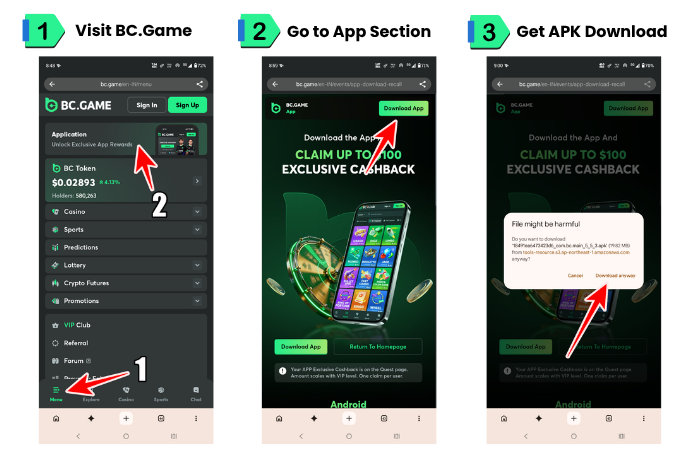
BC.Game app download illustrated step by step | Screenshots taken on 15/09/2026
Tap ‘Download BC.GAME App’ to go to the official website.
Tap on the menu icon, then tap on “Application.”
A new page will open; here tap on the “Download App” button.
A warning pop up will appear. Ignore the warning message and tap on the “Download anyway” button.
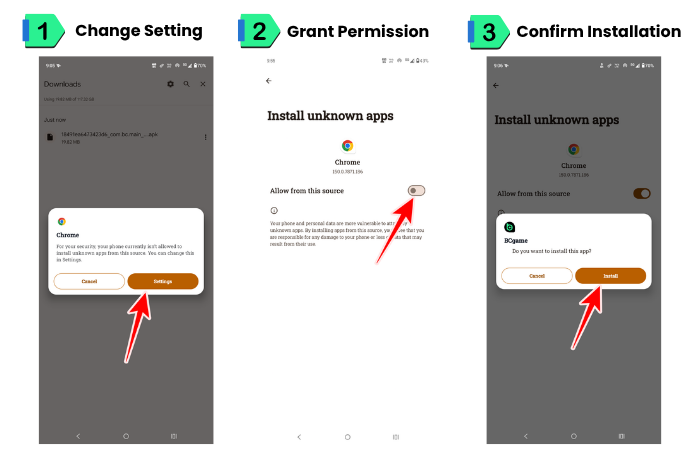
Tap on the downloaded APK file, a pop up will appear, here tap on “Settings” button.
Toggle on the “Allow from this source” option.
Tap on the “Install” button.
Congratulations, the app has been successfully installed on your device. Now, log in, or register a new account.
Finishing BC Game APK Download and Install | Screenshots taken on 15/09/2026
Before you download, grab the BC.Game bonus code first. You need to use it during registration on the app or the website, and unlock extra bonus funds when you make your first deposit.
BC Game App Download on iOS Devices
As we mentioned earlier, the app isn’t available on the App Store, so iPhone and iPad users need to make do with installing it as a home-screen web app through Safari. You can continue reading to know the step by step install process for iOS.
BC.Game App Download Using PWA Method
Progressive Web App or PWA exactly behaves like a native app. It features full screen, no browser bar, and it sits on your home screen like any other icon.
Here’s how it’s done on respective devices:
Adding BC Game Shortcut on Android Devices
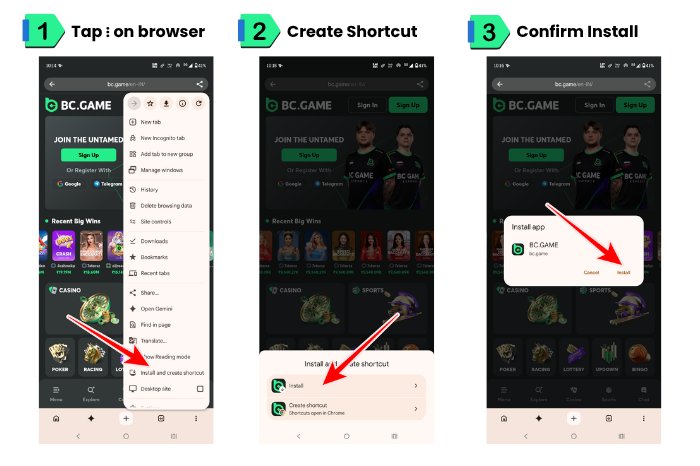
Open Chrome and go to the website and tap on the three horizontal dots at the bottom right of the screen.
Look for the ‘Install and create shortcut’ option; tap on it.
Tap on Install
Tap on Install in the pop up window.
Adding BC..GAME PWA Shortcut | Screenshot taken on 15/09/2026
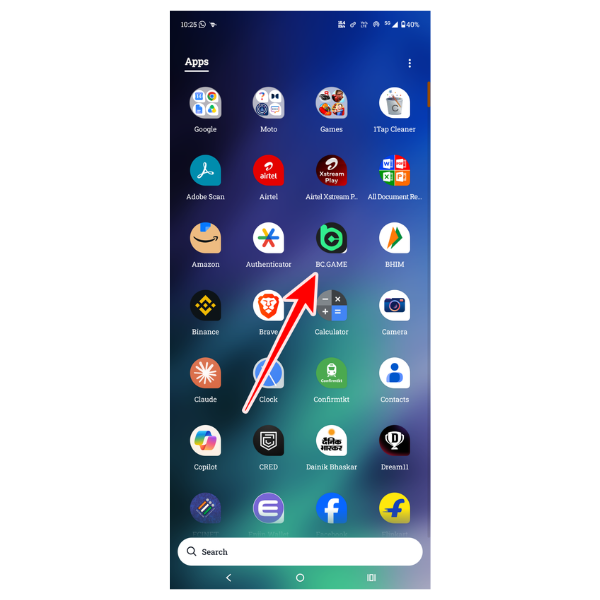
After installation completes, visit your app drawer and look for the BC.Game icon. Tap on it to open.
BC.Game App Shortcut added to the app drawer | Screenshot taken on 15/09/2026
Adding BC Game Shortcut on iOS Devices
Open Safari and go to the website.
Tap the “Share” icon (the square with an arrow pointing up) at the bottom of the screen.
Tap “Add to Home Screen,” then “Add.”
Tap on the icon to launch the app.
Meanwhile, don’t forget to use your BC Game promo code on registration to boost your first deposit.
BC Game App vs Mobile Website Version: Which One Should You Choose?
The app download and the web version give you the same markets and games. The app loads faster since data is cached locally and uses less data over time. The mobile website needs no storage and updates itself on every refresh.
Features
BC.Game App
BC.Game Mobile Website
Speed
Faster loading, data cached locally
Slightly slower, depends on browser
Storage Space
100 MB or more (Android)
0 MB
Data Usage
Less data after initial download
More data, reloads each visit
Access
Opens instantly from home screen
Requires opening browser everytime
Updates
Manual download for Android updates
Updates automatically on refresh
Performance
I ran both versions side by side on the same Wi-Fi connection. The app opened straight to my dashboard in a few seconds, while the mobile site took noticeably longer to fully load the odds. The app gets a slight advantage here because it caches your login and market data locally, so switching between markets happens almost instantly. That really matters when odds are shifting fast during a live match and you don’t want a page to sit there loading before you can place a bet.
Minimum Space Required
The Android APK needs at least 100 MB free, which is rarely an issue but worth checking if your storage is already tight. The mobile website and the iOS PWA shortcut don’t take up any extra space since nothing actually gets installed.
User Interface
Both versions share the same layout and menus, so you won’t feel lost switching between them. The app just renders it a touch smoother, with quicker taps on bet slips and market tabs, while the mobile site leans more on your browser and connection speed.
If you are using an older phone then we recommend you to use the mobile website. For latest devices, the app or the iOS home-screen shortcut is the best choice.
Top Features of The BC Game App
I tested the BC.Game app download on both platforms. Here’s what I found after testing it several times.
Right away, I noticed the app is much faster than the mobile website. It also has features that most other bookmaker apps don’t offer. The built-in crypto wallet works well on mobile, there’s a live community chat, and you can even do basic crypto trading.
I’ll go over each feature in more detail below.
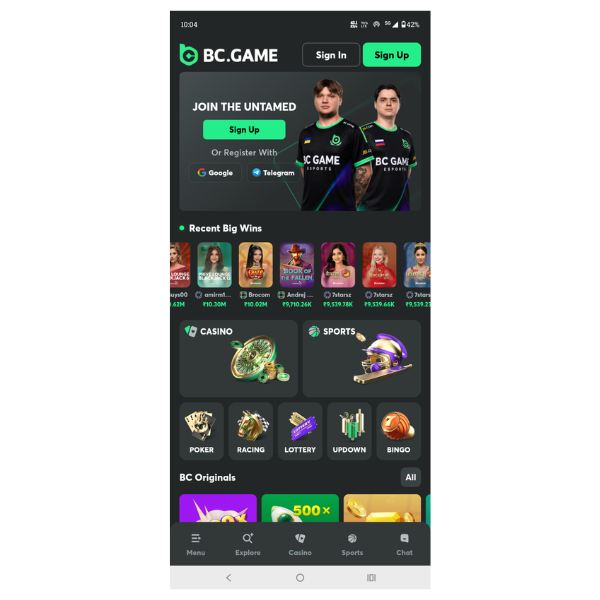
BC.Game’s feature-rich crypto-first platform | Screenshot taken on 15/09/2026
Excellent flexibility for Crypto and Fiat payment transactions
The platform has a dedicated system to handle crypto and fiat payment transactions effortlessly. I put this to the test by sending a small deposit through UPI and then withdrawing part of it in USDT. The UPI deposit reflected almost instantly, and the crypto withdrawal cleared in well under 10 minutes. Apart from that, you can deposit and withdraw directly using UPI, Paytm, and other regional payment methods, so your funds land (or leave) in minutes without extra conversion steps or fees eating into your winnings.
On-The-Go Social Features
Community engagement is one of the platform’s standout features. When I checked out the Indian live chat channel on BC.Game, the first thing that struck me was how active it was, with messages about match odds and casual banter in a mix of Hindi and English flying by within seconds of opening it. You can join the live chat to discuss ongoing matches, swap strategies and get a read on the crowd’s sentiment before you place a bet, all in real time without leaving the app. It’s less like using a betting app on your own and more like watching the match with a group of people who are just as invested in the outcome as you are.
App Exclusive Cashback and Offers
When you use the app it gives you some additional perks that you won’t get on the website. You will get exclusive cashbacks through the Quest page that credits back a slice of what you’ve wagered, win or lose. The higher your VIP level climbs, the bigger that cashback percentage gets, so regular players end up getting real value back over time instead of it just being a one-off signup bonus.
Better Betting Experience
You can place instant bets on sports events and slots, and track live scores right from the app. What actually makes a difference during a match is that you can monitor several games at once, place a bet in a single tap, and watch live matches without switching apps. In short, you’re not missing a goal or a wicket while you’re busy placing your next bet, and you can react the moment the odds shift.
Data Saver Mode
I left the app running for about an hour on my Jio connection while placing a handful of live bets, and it barely made a dent in my data pack. The app keeps data usage low, so it doesn’t chew through your daily data pack the way a heavier site might. It is quite useful when you’re placing live bets on the move and can’t afford to hit your data limit before the match even ends.
Two Factor Authentication
Two factor authentication adds a second login check on top of your password, so even if someone gets hold of your credentials, they still can’t get into your account or touch your funds without access to your phone. For an account holding real money, that extra step is worth the few seconds it takes every time you log in.
Push Notifications
You get instant alerts for match updates, goals, scores, and any changes to your bet slip, so there’s no need to keep the app open and refresh it during a game. You can get on with your day and still know the moment something happens that affects your bet.
Pros and Cons of the BC Game App
The app download for Android comes with a decent set of pros but at the same time it has some downsides too. Here’s a quick table:
Pros
+
Clean, easy-to-navigate mobile layout
+
Fast loading speeds even on slower connections
+
Full access to all sports markets and casino games
+
Wide range of crypto and fiat payment options
+
Biometric login for quick, secure access
Cons
-
Running in the background for live odds and push alerts can drain your battery faster than the mobile site
-
No dedicated App Store listing, so iOS relies on a home-screen web app
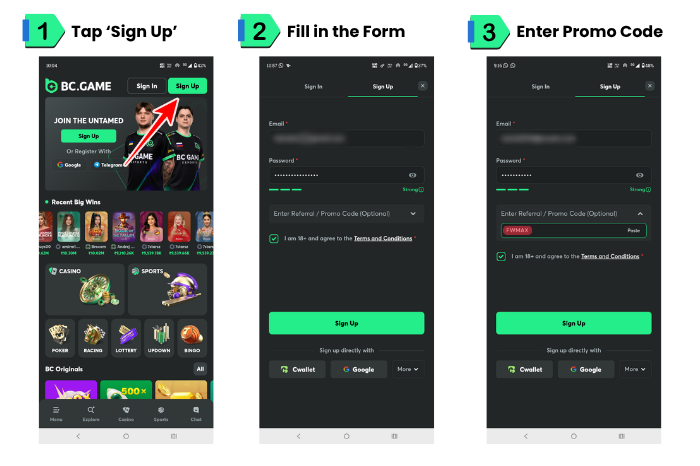
How to Sign Up Using the BC Game App?
Registration takes a couple of minutes once the app is installed. Here’s how it works.
Open the BC.Game app and tap “Sign Up.”
You can sign up or login via email or any given social account.
Paste the BC.Game referral code ‘fwmax‘ into the “Enter Referral / Promo Code” field.
After checking the T&C box, tap on the “Sign up” button.
That’s it! You are done, now make your first deposit to enjoy your favorite games.
BC.Game app registration illustrated step by step | Screenshots taken on 15/09/2026
Final Verdict: Should you Download the BC.Game App?
Both the Android APK file and iOS homescreen shortcut offer a good crypto betting experience, making the platform one of the most convenient bookmakers in India for crypto gambling enthusiasts.
Across the time I spent switching between the app and the mobile site, the community chat, quick crypto withdrawals, and two factor authentication were the features I kept coming back to. These are genuinely some of the best on offer.
Still, it is worth mentioning that the app isn’t without its downsides. Battery drain was the one issue that showed up almost immediately for me – running in the background for live odds and push alerts pulls more power than the mobile site does.
The app gets a high score for the fast processing of transactions, social network feature which makes it stand out among others. In my experience, the battery drain and the occasional KYC delay mentioned above were the only things keeping it from a perfect score.
KYC verification can also take longer than you’d expect, especially during busy periods, and I ran into this myself when a withdrawal sat pending for a few hours over a busy weekend. So, withdrawals aren’t always instant once you’ve hit the limits that require it. Make sure to keep this in mind if you’re planning on cashing out quickly.
Pritthijit Ray has 6+ years' experience in sports betting, with a focus on football and cricket. His passion for football is evident in his posts that blend robust knowledge of the game with genuine insights. Fluent in English, Hindi, and Bengali, Pritthijit brings depth and credibility to his bookmaker reviews and promo code analyses, ensuring they're informative, unbiased, and relevant.